Thursday, June 27, 2013

Templatised MVC Razor By Phill Haack

This templatised MVC Razor Html helper comes handy when we have complex View where data representation is required in tables or any list form. Phill Haack has given good example to help you with this construct. I m trying to rewrite everything, but to keep reference handy in my blog for future reference and development. I like the way custom iterator being used and passed as calling func with html writer as output.

Reference:
http://weblogs.asp.net/nmarun/archive/2011/02/28/templated-razor-delegates-phil-haack.aspx
http://haacked.com/archive/2011/02/27/templated-razor-delegates.aspx

I find this useful.


Thursday, June 20, 2013

MVC 4 Razor Quick Learning Book


Sr.No
Code Type
Syntax
1
Looping
@for(var i = 0; i < 10; i++){
  This is record @i
}
@foreach(Order order in OrderCollection) {
  @order.Cost
  @order.Quantity
}
 
 
2
Html Decode
@Html.Raw("

b>santosh

")
3
@Escape
 
We met @@time sharp!
4
Function
@functions{
  public bool isFooBar(string foo, string bar){
    return foo == bar;
  }
}
@{ var foo = "black";
  if(isFooBar(foo,"black")){
    Yup
  }
}
 
3
Switch Case
@switch(condition){
  case 1:
    @item.BodyText
    break;
  case 2:
    @item.Children.First().BodyText
    break;
  default:
    break;
}
 
4
Condtional
@if(item.HasValue("bodyText"){
  @item.BodyText
}else if(item.IsNull("bodyText")){
  this item is null
}else{
  Some other text
}
 

MVC Ajax JQuery
If we suppose want to load view based on Request received through ActionResult Controller .Then we can do that using following symantics

Public ActionResult Index()
{
if(Request.IsAjaxRequest()==true)
{
return Partial("XYZView",Model);

}
else
{
return view(Model);
}
}
ViewBag Vs ViewData

viewBag

is more cleaner dictionary to store dynamic data object.


Controller :
public ActionResult Foo
{
    ViewBag.FirstName="santosh";
    ViewBag.LastName="Poojari";
} 
View

@{
    var firstName = ViewBag.FirstName;
    var lastName = ViewBag.LastName;
}


ViewData


Controller :
public ActionResult Foo
{
    ViewBag["FirstName"]="santosh";
    ViewBag["LastName"]="Poojari";
}

View
@{    var firstName .= ViewData["FirstName"];    var lastName = ViewBag["LastName"]; }

Model

@model MVC4.Customer
This is declared at the top of view to include or reference the model. This is viewModel binding.
Once we do that we allow Model keyword to act as strongly typed viewmodel.
so now we can access Customer objectproperty  using
Hello @Model.CustomerName !

Expression: Foreach


    @foreach(var item in Model.Products) {


  •    @item.Name1

       @item.Upc1


  • }


    @if (Model.Count() > 0){    
            You've got data!    

    }

    _ViewStart.cshtml

    This is a bootstrap file that is applicable to all views in the solution.
    @{    Layout = "~/Views/Shared/_Layout.cshtml";
    }
    @{  
      if (HttpContext.Current.User.Identity.IsAuthenticated)   
     {      
        Layout = "~/Views/Shared/_Layout.cshtml";    
     }   
     else    
     {        
        Layout = "~/Views/Shared/_AnonLayout.cshtml";      
     }
    }

    @Html.Partial- Partial View

    Just partial page details _logOnPartial.chtml

    @Html.Partial("_LogOnPartial")

    @Html.RenderPartial-Partial View

    It used to call Controller with input parameter from view. The return type of controller would be Render.PartialView(PartialViewName.chtml)
    View
    @Html.RenderPartial("PersonName", Model.Person);
    Controller
    public ActionResult PersonName(string person)
    {
        return Render.PartialView(_LoginPartial);
    }

    @Html.RenderAction- Partial View

    View
    @Html.RenderAction("ListPartialView", "ProjectControllerMethod", new {personId = Model.Person.Id});
    Controller

    public ActionResult ProjectControllerMethod(int personID)

    {

        return View()

    }

    @Html.Action

    @Html.ActionLink

    @Html.ActionLink("Home", "Index",
    "Home")

    @Url.Action

    @Html.Raw ("

    Introduction

    ")

    Declarative HtmlHelper

    @helper Highlight(String value){    <span style="background-color: yellow">@value</span>}
    @Highlight("Foo")
    @helper CalcAndFormat(int a, int b, Func<intint, int> calc){    var sum = calc(a, b);    

    if(sum % 3 == 0)    
     {       
     @Highlight(sum.ToString())       

    else 
    {        <span>@sum</span>    }   

    }


    @* Outputs “27” with yellow highlighting *@
    @CalcAndFormat(3, 9, (a, b) => a * b)
    @* Outputs “50” with no highlighting *@ 

    @CalcAndFormat(2, 4, (a, b) => a * b + 42)

    Note:Spark Engine is more powerful than Razor.

    Reference :http://www.code-magazine.com/article.aspx?quickid=1103041&page=5

    Thursday, June 13, 2013

    MVC 4 Razor - Report Viewer Control RDLC Reporting

    I've been struggling to render the RDLC in MVC 4 or any version using Razor view chtml. If your project is in traditional Asp.net and you planning to rewrite in mVC in a view to reuse most of the component as is then you've to be bit conscious. If you have extensively used RDLC and reportviewer control and then you migrate to mvc architecture .Beware this is not possible in MVC razor view. You can very well get MVC response output in pDF,excel.(****.mind it not in html ) as  adownload then there is options available.
    http://weblogs.asp.net/rajbk/archive/2009/11/25/rendering-an-rdlc-directly-to-the-response-stream-in-asp-net-mvc.aspx

    But if you want to rendered it in html or embed in partial view as we have reportviewer control in asp.net this is not possible to achieve. In such case you can end up evaluating other third party component. Micro assessment of each migrating component plays a crucial role. I had my bite of troubles , hope you don't fall in same situation. MVC asp.net needs to get matured unlike silverlight we have the case. I keep my finger cross and I personally feel MVC asp.net and javascript with HTM5 rocks.

    Bye for now.

    Tuesday, April 23, 2013

    Networking :DHCP, IPv4 and IPv6

    http://en.wikipedia.org/wiki/Dynamic_Host_Configuration_Protocol

    The DHCP server maintains a database of available IP addresses and configuration information. When the server receives a request from a client, the DHCP server determines the network to which the DHCP client is connected, and then allocates an IP address or prefix that is appropriate for the client, and sends configuration information appropriate for that client. DHCP servers typically grant IP addresses to clients only for a limited interval. DHCP clients are responsible for renewing their IP address before that interval has expired, and must stop using the address once the interval has expired, if they have not been able to renew it.

    On receiving a valid request, the server assigns the computer an IP address, a lease (length of time the allocation is valid), and other IP configuration parameters, such as the subnet mask and the default gateway

    DHCP is used for IPv4 and IPv6.

    IPv4 is 32 bit max address space (232) addresses
    IPv6 is 128 bit max 2128 addresses

    Friday, April 19, 2013

    Windows 2012 Virtualization Insight.

    I have started Virtualization VDI with Win 2008 R2 Hyper-v , now I m planning to migrate it to Windows Server 2012.

    Few quick things ,
    1) Migration of Existing  VHD image to VHDX in 2012.
    2) No Windows Server 2012 enterprise Edition.
    3) Windows server 2012 standard with Hyper v. Allowed 2 VMs  per Server Licenced.
    Data center edition muliple VMS.

    Have used Intel SSD drive for better performance as we have VS2012 with complex solution exhaustive built process.

    Reference:

    http://www.microsoft.com/en-us/server-cloud/windows-server/server-virtualization.aspx\

    http://blogs.technet.com/b/uspartner_ts2team/archive/2012/11/02/how-to-setup-hyper-v-on-a-windows-server-2012-server.aspx

    http://blogs.msdn.com/b/virtual_pc_guy/archive/2012/10/03/using-powershell-to-convert-a-vhd-to-a-vhdx.aspx

    http://blogs.technet.com/b/keithmayer/archive/2013/04/05/getting-started-with-hyper-v-server-2012-hyperv-virtualization-itpro.aspx

    http://blogs.msdn.com/b/virtual_pc_guy/archive/2012/10/02/converting-a-vhd-to-a-vhdx.aspx


    Thursday, April 18, 2013

    Hack :Tuning Windows For TCP/IP Performance.

    Today I m struggling lot to establish  VMs guest OS to access shared folder of host Hype-v Windows server 2008 R2. After wrecking my head and intense search I got the solution for the given problem in microsoft support site. Its very unusual besides having set right at first place never thought tuning network tcp/ip will resolve this. Still its hard on my part for not getting answers why running following below command solved my problem. Yup! I'm not a network or infra guy.. just thought to file this findings in my blogpost for future reference.


    1. netsh int tcp set global chimney=disabled
    2. netsh int tcp set global NetDMA=disabled
    3. netsh interface tcp set global autotuning=disabled

    Where I ended up...
    http://social.technet.microsoft.com/Forums/en-US/winserverhyperv/thread/82c9371a-eab9-4526-ba34-81d1f3bdc141/

    Final Verdict..

    http://support.microsoft.com/kb/951037

    What it state.
    TCP Chimney Offload overview TCP Chimney Offload is a networking technology that helps transfer the workload from the CPU to a network adapter during network data transfer. In Windows Server 2008, TCP Chimney Offload enables the Windows networking subsystem to offload the processing of a TCP/IP connection to a network adapter that includes special support for TCP/IP offload processing.
    TCP Chimney Offload is available in all versions of Windows Server 2008 and Windows Vista. Both TCP/IPv4 connections and TCP/IPv6 connections can be offloaded if the network adapter supports this feature.

    Wednesday, April 17, 2013

    Quick Code Dynamic Sql server Script


    Declare  @strWhere  nvarchar(200),

    @strMainQuery nvarchar(400),

    @FromIDbigint ,

    @ToIDbigint


    set @FromID=11111

    set @ToID=11251


    if(@FromID<> null and @ToID<> null)

          set @strWhere= ' IS NOT NULL'

    Else

          set @strWhere= ' between ' + Convert(varchar(20),@FromID) + ' and ' +  Convert(varchar(20),@ToID)


          set @strMainQuery ='SELECT

                d.ID,

                name,

                address,

                telephone

          FROM

                dbo.Customer p

                left outer join dbo.CustomerService d on p.ID = d.ID

          WHERE d.ID' + @strWhere +

          ' ORDER BY

                d.ID'

    select @strMainQuery

    exec(@strMainQuery)

    ESP Fast Search Dictionary Guide Overview

    Overview

    Any product retail related site , portal requires robust search engine to pull you the information you want. It has to be pretty fast to hook you with right information and help you through. If not then you move to next site which satisfy your shopping needs. Well this search engine can satisfy various business requirement not just retail or product industry . You can make use in any domain where data search is essential.

    Fundamentals-

    Search works on parsing of data and extract information and present it to end users. What next , parsing must be fast this comes with indexing of data. Now if your data is in database server this may adds up overhead with lot of response time. So we processed this data and get it indexed through scheduled job during non business hours. This may sit on some search engine server for better performance,

    How to help end users , what goes IN and out?

    Dictionary- This is place holder where all important words are organised and sorted. This is a lookup or a catalog before it actually fetched the detailed results. This can act like address.

    Once user gives search words, phrases or anything, the search system has to be smart to pick the right reference from dictionary and send the detailed information to end users.

    Now do this following entity comes into play.

    Linguistic Guide- To identify language of the document or data. use language culture.

    Tokenization- Split and normalize the phrase or joined words.Splitting of stream of text. Stemming or segmentation.

    Lemmatization- Identify grammers of data . Say Car or Cars. Plural. Singular, positive, comparative, superlative for adjectives. tense or verbs.Compute may also give computer or computing.

    Spell Check- There are several properties such threshold,maxlength, min length, exact or tolerance level. It corrects the wrong spell words and suggest Did you mean ? words to display results.Its important dictionary holds valid spelled words to lookup.

    Anti Phrasing and stop words: It will filter most come phrase such as I am, who is ?, where are? etc.
    Say for example. You give a search Who is Mr. Miller It will search for only Mr. Miller from source.

    Synonyms: It checks for words with similar meanings. For e.g  My Car search will extract Automobile information aswell.

    Entity Extraction: Detection of Entity such as names, company, location, country,street names ,file name, telephone,etc,

    Noun Phrase Extraction: It identifies the noun words from the dictionary,

    Structural Analyis: It classify the content of the page such as buy, order or shopping

    Phonetic Search: These are search words mispelled due to pronounciation. Such as Schwarzenegger and user may search for shwarsenegger.

    Offensive Content Filter: Content having offensive meanings are filtered.

    The search engine does have syntax and semantics around using above construct thus enabling smart search engine.


    Thursday, April 11, 2013

    Troubleshooting Microsoft Commerce Server Microsoft.CommerceServer.Internal.ContentListHelper.dll Issue.

    Recently my team was struggling lot on Microsoft.CommerceServer.Internal.ContentListHelper.dll version issue related to 32 x86 vs 64 bit AMD . Well how this came up. We had VS2010 installed with commerce server 2007(upgraded to 2009). Later we planned to migrate out VS IDE to V2012 for better ALM activity. What popups for our surprise was this issue.

    Bad Image or something.... Remember its kind of rise of DLL hell..

    "Could not load file or assembly 'Microsoft.CommerceServer.Internal.ContentListHelper' or one of its dependencies. An attempt was made to load a program with an incorrect format."

    http://social.msdn.microsoft.com/Forums/en-US/commserver2007/thread/526f70f8-35bb-4221-b9cd-73406d202aa2/

    The solution says that you remove the dll from bin folder and it will work fine. But the nightmare is it will appear every time you rebuilt the solution.

    Here is the few workaround.

    1) Remove reference from Registry.
    Microsoft Commerce Server Microsoft.CommerceServer.Internal.ContentListHelper.dll
    Go to Regedit /> look for HKEY_Classes_Root->Installer->Assemblies->Global->Microsoft Commerce Server Microsoft.CommerceServer.Internal.ContentListHelper

    2) Go c:/windows/assembly/ uninstall Microsoft Commerce Server Microsoft.CommerceServer.Internal.ContentListHelper

    3) Go to C:\Program Files (x86)\Microsoft Commerce Server 2007\Assemblies and remove
    Microsoft Commerce Server Microsoft.CommerceServer.Internal.ContentListHelper

    Now you can built your solution flawlessly. As per my research and understanding  Microsoft.CommerceServer.runtime contains this referenced dll Microsoft Commerce Server Microsoft.CommerceServer.Internal.ContentListHelper.

    Do post your comments, if your problem is resolved by this. Take care ..Bye for now.


    Tuesday, April 9, 2013

    Troubleshoot Remote Desktop access Win 2008 R2 VM Hyper-V

    Recently I setup virtual machines in Hyper-V windows 2008 R2 Sp1. I faced problem  accessing virtual machine through remote access RDP(Run ->Mstsc). The access denied , remote server not available or remote service is not enabled message it flashed as dialoq.

    Troubleshooting Steps.
    1. In server manager I checked whether the Domain Profile is connected state. With windows firewall off.
    2. Note. There are three profile Domain, Public and private profile.
    3. I check Remote Desktop Enabled. If not then one has to configure remote desktop option.
    4. Check whether server is bind with the domain network not configured as workgroup/workstation.
    Now verify the pulse between two system ..establishing connectivity check
    Remote server to client machine.

    Get CMD-> Ipconfig
    Ping Ip address.

    Then type arp-a command to check the node connectivity.

    If any problem with this then above steps are not followed properly. There are other ways to activate remote access with lookup in Group Policy.

    By for now..

    Refresher: Watch out this movie  He's just not into me Cast Jennifer Aniston, Bradley cooper , Ben Affleck .........

    Sunday, April 7, 2013

    VS2012 Memory Profiling Insights.

    Here is why you must look for VS2012 memory Profiling. Apparently Tier Interaction VS2010 has done good job however memory profiling was not that profound as it is in VS2012. For more information you can check out http://blogs.msdn.com/b/dotnet/archive/2013/04/04/net-memory-allocation-profiling-with-visual-studio-2012.aspx

    The purpose of this diagnostic tool is to find two essential problems in given system.

    1. Memory Leaks- The unrooted memory referenes are freed by GC. Sometimes it may happen there are memory that are no longer used and still have rooted references are still not clear or handles such cases can be figured out through this tool.


    2. Unwanted Allocation: Rule- More memory allocated more frequent GC happens.More objects survice GC collects, More GC operations performed to check null object references. Unwanted allocations by program may lead to unneccessary GC operations which latter adds up to the performance of the applications.

    One can also look at Red Ant Profiler tool and Perf

    Wednesday, April 3, 2013

    IIS Log and Http.sys Tips and Tricks


    why can't I see IIS logs written immediately after a request?

    The anwer is that the HTTP.SYS buffers the IIS logs and flushes to the disk every 60 seconds because of performance issues.

    If you are running IIS 7.0 or IIS 7.5 and if you want to flush the HTTP.SYS buffer to the disk immediately, you can open a command prompt and run the following command:

    netsh http flush logbuffer

    http://blogs.msdn.com/b/amb/archive/2011/12/06/why-does-not-iis-log-requests-immediately.aspx

    Tuesday, March 26, 2013

    C# 4.5 and CLR Revolution

    C# Generation Next


    CLR Inside

    Courtsey Maoni Stephen's White paper
    http://blogs.msdn.com/b/dotnet/archive/2012/07/20/the-net-framework-4-5-includes-new-garbage-collector-enhancements-for-client-and-server-apps.aspx


    1. Background Server Garbage Collection

    Before version 4, the .NET Framework provided a concurrent GC mode that performed full GCs concurrently with user code (vs. blocking, which pauses all user threads), thus reducing pause time for full GCs. This mode was available only for workstation GC.

    In the .NET Framework 4, we delivered an improved version called the background workstation garbage collection, which reduced latency but only benefited client apps.

    In the .NET Framework 4.5, we have delivered background server garbage collection, which is typically used for server apps. As a result, all apps now have background GC available to them, regardless of which GC they use.

    Backgorund GC Operation


  • They apply only to generation 2 GCs.
  • They don't compact the heap.
  • Generation 0 and 1 GCs do not happen concurrently with background GC, but they suspend all user and background GC threads


  • 2. GC Collect Inversely Proportional to Throughoutput Balanced LOH

    More GC collect less throughoutput.Vice versa

    Common Root Cause for above IMBALANCE GC HEAP
    For server GC, GC trigger when heap runs out of allocation.

    1 Logical processors have 1 heap.

    In one application server there are many worker processors which spuns many threads and these threads in turns consume memory.

    In the .net framework 4, small object heap memory allocation is balanced where as LOH is not balanced due to which the GC triggers lot.

    In the .net framework 4.5,SOH and LOH are balanced hence it triggers less GC.


    3.Support Large Dataset >2GB

    We can now able to process array with large dataset. It is configured using .Previously it was throwing OutofMemory exception due to 32 bit nature of OS/Framework.


    4. Reuse free available memory after GC collect.

    In earlier releases of the .NET Framework, once a memory block was rejected as a candidate for an allocation, it was removed as a candidate for subsequent allocations.

    In the .NET Framework 4.5, we now retain free memory blocks as candidates for allocation requests until they are used. The new algorithm uses LOH space much more efficiently, leading to decreased fragmentation and memory use.


    5. SustainLowLatency- Avoid Full blocking of GC

    While the SustainedLowLatency setting is in effect, generation 0, generation 1, and background generation 2 collections still occur and do not typically cause noticeable pause times. A blocking generation 2 collection happens only if the machine is low in memory or if the app induces a GC by calling GC.Collect().


    6. NUMA-Non uniform Memory Access, Black box for me.

    Unable to understand the basic fundamentals of it. If someone can flash few reference to help me understand this. Regret for Ignorance on this subject.


    Sunday, March 24, 2013

    Asp.net Pipeline , httpcontext And IIS 7.5 integrated Mode

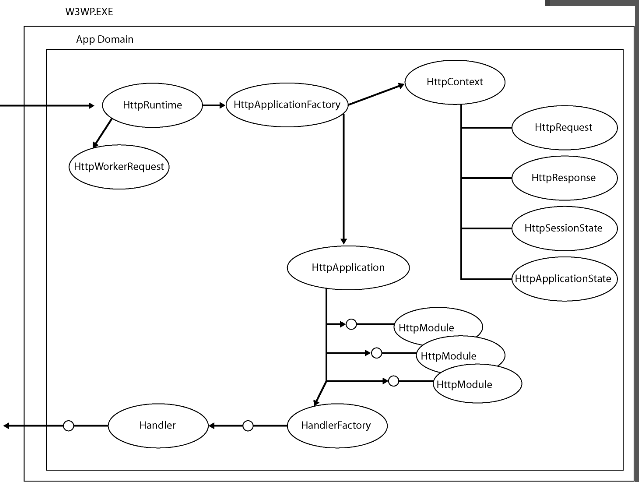
    Asp.net request pipeline mode is something that each asp.net developer must know. Its difficult to memories or understand the concepts because IIS and .net framework is going through radical changes very often. Still we must touch base few basics. All I want one to go through HttpRuntime, Httpcontext, Httpapplication , Httpmodule and HttpHandler. If we clearly understands its flow with respect to IIS handling we will be able to troubleshoot any issues or create any custom pipeline based on this.

    For e.g IIS integrated mode support httpcontext.current.request.header.add()...
    HttpContext deals with response, server, requests, error, session , application
    HttpModule deals with application startup authorization, authentications etc.
    HttpHandler based on file extension we can set events to perform.
    HttpRuntime decides configuration such as request length, queue length, Querystring and so on.


    Decision Analysis and Resolution Matrix Called as DAR


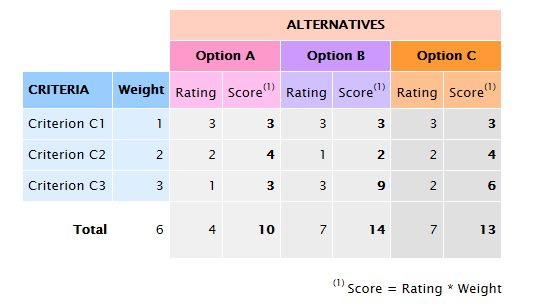
    We heard lot of CAR analysis, Causal Analysis and Resolution, like we also have Decision Analysis and Resolution. In CAR we tend to find the root cause and then derive the resolution. Similarly in DAR we evaluates different factors or criterias against options available to derive to best possible solutions or resolutions.

    For e.g we want to setup Virtualization so we have many options for us to evaluate before we decide on technology. Say for example..In case of VDI...virtual desktop environment, we have various options available such as Virtual machine based on Virtual pool, Remote desktop session based or virtual machine session based. Now if want to choose the best possible solution then we need to have a all relevant factors or parameter to evaluate against. Here in this case we can evaluate the options against scalability, availability, performance, maintenance, consistency, cost etc...

    For any architect , it is very essential that one knows about such tools or methods to evaluate it. At the end steering or management committee needs statistics and full proof solution to support their decision even. What If I say something right? will that make sense to world ? The answer is Big 'NO'. The business is driven based on facts and figure.


    Fig 1


    DAR Matrix

    Friday, March 22, 2013

    Thursday, March 21, 2013

    IIS 7.5 Load User Profile = true for Registry issue due Windows User Profile service

    Today was strange day for me. It all started with trouble in the paradise. We recently did deployment of small changes in MS commerce server 2007 and EPI server. Now wcf service and website hosted in IIS 7.5. With main website having virtual directory pointing EPI server content management system.

    Cut Long story short-
    We checked the event log viewer for the root cause..And below was the whole script...
    In the Application Event log, the following event was logged:
    Log Name: Application
    Source: Microsoft-Windows-User Profiles Service
    Date: 2010/5/31 13:10:01
    Event ID: 1530
    Task Category: None
    Level: Warning
    Keywords:
    User: SYSTEM
    Computer: ComputerName
    Description:
    Windows detected your registry file is still in use by other applications or services. The file will be unloaded now. The applications or services that hold your registry file may not function properly afterwards.
    The following information was included with the event:
    2 user registry handles leaked from \Registry\User\S-1-5-21-3837118448-4114559512-2412068830-1006_Classes:
    Process 1956 (\Device\HarddiskVolume2\Windows\SysWOW64\inetsrv\w3wp.exe) has opened key \REGISTRY\USER\S-1-5-21-3837118448-4114559512-2412068830-1006_CLASSES
    Process 1956 (\Device\HarddiskVolume2\Windows\SysWOW64\inetsrv\w3wp.exe) has opened key
    The problem was due...
    If you have other application pools even they will use the same c:\windows\temp folder. If you set the option to load the user profile the temporary directory will be now change to use the profile’s temporary folder C:\Users\apppooluserid\AppData\Local\Temp.
    If the profile is loaded you also have access to all the custom environment variables for that user.

    Here’s a question what do you think will the temporary folder be when the Application Pool identity is set to Network Service and Load User Profile is set to True ?

    It is not C:\Users\NetworkService\AppData\Local\Temp. but C:\Windows\ServiceProfiles\NetworkService\AppData\Local\Temp
    This event is letting us know that when the profile was being unloaded w3wp.exe with process id (PID) 1956 had a registry key handle to the profile hive for the user with SID S-1-5-21-2641105361-2081720548-7543625-1000.


    According to kb947239, event 1530 occurs because Windows automatically closes any registry handle to a user profile that is left open by an application.

    In previous versions of Windows, we need to download and install the User Profile Hive Cleanup Services (UPHClean) to ensure user sessions are completed terminated when a user logs off. So in Windows 2003 IIS6, UPHClean isn’t downloaded by default.


    After Windows Vista, UPHClean utility is built into User Profile service which always runs. On Windows 2008, UPHClean removes access to files or directories data that was cached by the application for the file is lost. This could cause the process to fail because it cannot read from the file. This issue seems to be improved in UPHClean v2.0.

    The solution to preventing this problem turns out to be a very simple configuration setting in IIS7's Application Pool Advanced Settings.

    Lucky for us, the issue was resolved after enabling Load User Profile in Application Pool setting.

    IIS doesn't load the Windows user profile, but certain applications might take advantage of it anyway to store temporary data. What this does is tell IIS to completely load the user profile for the entirety of the execution of the application.

    Thank God...It just saved my day....

    Wednesday, March 20, 2013

    Its all about IIS 7.5 .You must know

    We got two important parts in IIS 7.5
    Integrated Mode : I called it as Http Module Pipeline
    Classic Mode       :       More of ISAPI

    Further isolation:

    User Mode: IIS Log
    Kernel Mode : Refer HTTErr log..in windows/system32/LogFiles/..

    One can use log parser to analyse the logs and find the root cause of the problem.

    Important App Pool Settings:

    1. Request Queue length Limit : Default 1000..
    2. Overlap App pool recycle.
    3. No of Worker processor.
    4. Switch off Asp.net debug mode off..
    5. Regular Interval of App Pool Recycle.


    applicationHost.config file ( Found in location: C:\Windows\System32\inetsrv\config)

    ApplicationHost.config is the root file of the configuration system when you are using IIS 7 and above. It includes definitions of all sites, applications, virtual directories and application pools, as well as global defaults for the web server settings (similar to machine.config and the root web.config for .NET Framework settings).

    IIS Windows Process Activation Service (WAS)

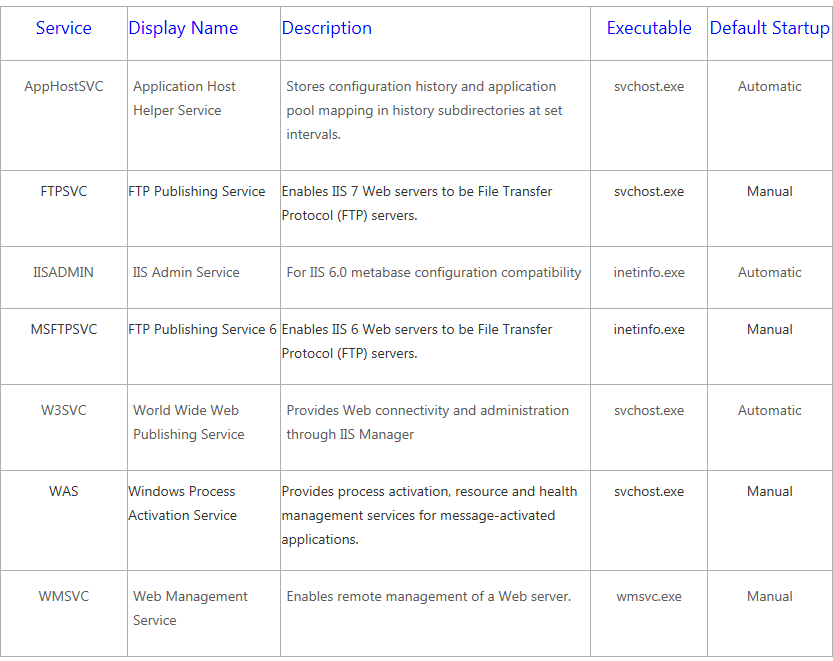
    Windows Process Activation Service (WAS) manages application pool configuration and the creation and lifetime of worker processes for HTTP and other protocols. The World Wide Web Publishing Service (W3SVC) and other services depend on WAS.

    NameDescription
    IIS Application PoolAn Internet Information Services (IIS) application pool is a grouping of URLs that is routed to one or more worker processes. Because application pools define a set of Web applications that share one or more worker processes, they provide a convenient way to administer a set of Web sites and applications and their corresponding worker processes. Process boundaries separate each worker process; therefore, a Web site or application in one application pool will not be affected by application problems in other application pools. Application pools significantly increase both the reliability and manageability of a Web infrastructure.
    IIS Protocol AdapterAn Internet Information Services (IIS) protocol adapter is a Windows service that receives messages on a specific network protocol and communicates with The Windows Process Activation Service (WAS) to route incoming messages to the correct worker process.

    http://msdn.microsoft.com/en-us/library/ee377050.aspx