Wednesday, November 27, 2013

.net 4.5 Data Parallelism vs Task Parallelism

If you have come across TPL task parallel library of .net 4.5 its important that you also have focus on below new library.

  • Task parallelism is the simultaneous execution on multiple cores of many different functions across the same or different datasets.
  • Data parallelism (aka SIMD) is the simultaneous execution on multiple cores of the same function across the elements of a dataset.
  •  http://msdn.microsoft.com/en-us/library/dd460717(v=vs.110).aspx
  • http://msdn.microsoft.com/en-us/library/ff963548.aspx
  •  
  • http://www.zdnet.com/understanding-task-and-data-parallelism_p2-3039289129/

    Data parallelism is pretty simple. It is the concept that you have a lot of data that you want to process — perhaps a lot of pixels in an image, perhaps you have a whole lot of payroll cheques to update. Taking that data and dividing it up among multiple processors is a method of getting data parallelism. This is an area that supercomputers have excelled at for years. It is a type of problem that is pretty well understood and more emphasis has been put on data parallelism in the past than on task parallelism.
    Task parallelism, on the other hand, is where you have multiple tasks that need to be done. So perhaps you have a large data set and you want to know the minimum value and you want to know the maximum and you want to know the average. This is a rather trivial example but you could have different processors each look at the same data set and compute different answers. So task parallelism is a different way of looking at things. Instead of dividing up the data and doing the same work on different processors, in task parallelism what you're doing is dividing up the task to apply.
    The most common task parallelism is something called "pipelining

    Data Parallelism

    http://msdn.microsoft.com/en-us/library/dd460720(v=vs.110).aspx

    Parallel.ForEach{

    }

    Task Parallelism

     
    static

    void Main(string[] args)

    {


    Task[] tasks = new Task[2]

    {


    Task.Factory.StartNew(() => {


    TaskA objTaskA=new TaskA();


    // objTaskA.MessageSent += MessageSent;


    // objTaskA.TaskCompleted += TaskCompleted;

    objTaskA.Activate();

    }),


    Task.Factory.StartNew(() => {


    TaskB objTaskB=new TaskB();

    objTaskB.Activate();

    })

    };


    Task.WaitAll(tasks);


    }


    Tuesday, November 26, 2013

    VS2012 IDE Issue No exports were found that match the constraint contract name

    Today I tried to add new project in VS2012 IDE for development it didn't allow me to proceed as it popup an error stating this
    VS2012 IDE Issue No exports were found that match the constraint contract name

    I got the workaround in Stackoverflow-
    http://stackoverflow.com/questions/17596543/no-exports-were-found-that-match-the-constraint-contract-name

    Step 1: Close VS2012
    Step 2:
    Just delete or rename this folder:
    %AppData%\..\Local\Microsoft\VisualStudio\11.0\ComponentModelCache
    

    Step 3:
    Restart VS2012


    The probable reason would be VS2012 had not been closed for longer period of time therefore resulting in above error.

    Technical Design - Application Architecture These Terms does matters.

    At application architecture level, we come across layers and tiers terminology.I will not delve much into these terms now but would rather focus on the details of it.  Yes we know presentation , business, service , data access layer and many such stacks that defines application architecture at logical level. We then built solution taking these layers pointers into consideration. Then comes what the code files where we have domain entities, utilities , classes, interface and so on..

    Well, sometimes it becomes non trivial to appropiately name such source code files unders these layers.

    To complete these blogs actually I need an expert advice to make this meaningful and comprehensive. I'm sure there is no such reference atleast available online. Everyone has their own theisis of explanation and fundamentals behind.

    Most common suffix ending list of file name.

    1. Manager
    2. Provider
    3. Handler
    4. Helper
    5. Factory
    6. Services
    7. Extender
    8. Contract

    So On

    The point is as naive architecture I may put them wrongly and may latter refractor based on review. I'm sure there can be rule book across but fail to find one.

    Need help.

    Thursday, November 14, 2013

    Predefined type 'System.Object' is not defined or imported

    This is rarest of the rare error that comes when we build/debug solution in Visual Studio for .net . The problem is the missing MSCORLIB dll system.core which somehow not exists in .csproj file. The developer resort this by recreating new solution or clean the folder, get the latest code from TFS and then build it. But the problem sometimes lies as-is. One can take this to next level by locating this tag . if this is not present Add this. Forgot to mention, open this file in notepad rather VS IDE.

    Then you rebuild the solution once again to get your ANIMAL(I mean your solution-which may have large number of class library in it) run.
    Do post your comment if run into similar problem or please let me know the best way to get away with this one.

    Tuesday, November 12, 2013

    Design Pattern and Most general Software Terminology

    Its long time in my career and sometimes we flumble with the basics, concepts and fundamentals.
    Here is the list of few design patterns or terminology where we come across during day to day SDLC life cycle. I will try updating this particular post in future to include the most favourable one.

    Facade: It provides simplied interface to a larger body of code-class library. In simple terms a group of class library or dll referenced in single interface and this later expose to calling events or client.
    Purpose - It wraps poorly designed collections of API into or with single well designed API.

    Adapter : Is also called Wrapper pattern or Decorative pattern (GOF ). The actual usuage or orgin, when one should coin this- This is to be used when we have module which is to be used but incompatible with other module. At such places we create interface out of the class and create compatible bridge to use across.

    Boiler Plate  Code- Is a section of code that can be included in many place with no or minimal changes.

    • Shotgun Debugging- To apply too many solution at a time to solve issue.Troubleshoot.
    • Spaghetti Code- To many branching of code, difficult to read and understand
    • Smoke Testing- To do high level testing to ensure system do not break. This ignores finer level of testing. Imagine a smoke pass into pipe to check leak
    • Regression Testing-Testing to ensure new changes do not break existing functionality.
    • Write Only Code- Difficult to read
    • Runtime-
    • Break Fix-
    • Service Pack
    • Drivers
    • HotFix-
    • Refactoring- Change system internally without affecting functionality.
    • Pilot
    • Prototype
    • Proof of Concept
    • Psuedo Code- Code that is written in user readable format unlike programming language.
    • Peer Review
    • Patch
    • Plumbing work
    • Legacy System
    • Gold Code- Code that is live and burn in disc. Final release product.
    • Gap Analysis
    • Impact Analysis
    • Evaluation
    • Feasibility Check
    • AntiPattern- In appropiate solution for a problem but still used as temporary setup.


    Thursday, October 24, 2013

    Symmetric Encryption, Asymmetric Encryption and Hashing Cryptographic


    1. Symmetric encryption. Uses the same public key to encryption and Decryption
    Algorithm : DES, AES, 3DES,RC4

    2. Asymmetric Encryption: Use public key to encypt the data and private key to decrypt the data.
    Like email exchange.
    Algorithm : RSA

    Sender encypts data with public key and reciever decrypt using private key.

    3. Hashing is kind of cryptographic unlike encryption. It is also called one way encryption.
    Algorithm : MD5 and SHA-1
    It uses secret key or checksum or password salt-random generated value to encrypt the data. It is called one-way hashing as we cannot reverse the original data or decrypt the value back to clear text.

    http://packetlife.net/blog/2010/nov/23/symmetric-asymmetric-encryption-hashing/

    Monday, October 21, 2013

    VS2013 Performance Test Approach and Strategy

    Summary-
    1. KPI /metrics to identify performance index.
    Refer this http://msdn.microsoft.com/en-us/magazine/cc188783.aspx
    The next step is to clearly define your metrics. Examples of metrics include the number of orders processed per minute or the number of milliseconds required to execute a request on an ASP page. Metrics allow you to quantify the results of the changes made between each of your test runs. They provide a comparison to the standard defined for your Web application.

    2. Saved your load test results in Database for reports comparison against baseline. Identify baseline date
    Say SUT test. One can baseline single user test for given scenario consisting of test cases.
    SQL Express: SQLCMD /S localhost\sqlexpress /i loadtestresultsrepository.sql
  • SQL: You can install the database to any existing SQL server. For example, if you had a SQL server named ContosoServer1 you would use the following command:
    SQLCMD /S ContosoServer1 -i loadtestresultsrepository.sql

  • http://msdn.microsoft.com/en-us/library/dd997707.aspx
    http://msdn.microsoft.com/en-us/library/vstudio/ms182600.aspx

    3. Identify the acceptable response time per request call
    4. Permissible transaction failure or error count.
    5. Combo load test and load test with data driven.
    Say
    Scenario S1
    S1_01 Login
    S1_02 Perform Step 1
    S1_03 Perform Step 2

    Scearnio  S2
    S1_01 Add Details
    S1_02 Perform Step 1
    S1_03 Perform Step 2

    Sceanrio S3
    S1_01 Update Details
    S1_02 Perform Step 1
    S1_03 Perform Step 2

    Broadly I identify 3 high level test scenario. Login, Add and Update

    Ideal Test Condition: Load test With 5 users
    User 1: S1
    User 2: S1
    User 3: S1
    User 4: S1
    User 5: S1
    Same Scenario Different data points different User.
    Run: Concurrent
    Duration of load run: say 30 mins
    Capture Response time


    Real Time Condition: Combo load test with 5 users
    User 1: S1
    User 2: S2
    User 3: S3
    User 4: S2
    User 5: S3
    Different Scenario Different data points different User.
    Run: Concurrent
    Duration of load run: say 30 mins
    Capture Response time


    Friday, October 18, 2013

    SEO: Hash bang vs Push state/Replace State Html5

    SEO in simple terms ensure the web page ranking and indexin for search engine. In order to do so we built our web pages to align to that standard and rules to be SEO non agnostic. Tags, Keywords, meta data and page state helps to get into top of the search list and there we called is is SEO compliant.

    Hash # in website URL helps enables interactive within page. It helps locate quick element and navigation across page scroling without having to make a request back to the server. With this we can manipulate browser history when moving forward and backward due to which overall segment of SEO is defeated. To resolve this Google came up with workaround of Hash # Bang ! in url
    sample link http://well.com/#!/User1

    Now it is not a standard but solution to work with SEO on hash issue. We do heavy duty at backend code in server to check “_escape_fragment_” This is again one of the problem in terms of processing and latency.

    Looking into all this HTML5 Push state is good solution to above problem

    For such URL http://example1.com/#images1/1 to tell a JavaScript application to load image #1 on to the screen, can be given as URL: http://example1.com/images1/1 – with no Hash at all

    pushState(data, title, url)
    replaceState(data, title, url)

    window.history.pushState(state, state.title, "detail.aspx?article=" + article);


    Thursday, October 17, 2013

    VS2013 Load Test RIG Installation

    VS2013 and its power packed Test Manager for application performance test suite is going to be big leap when moving from QTP load runner. It offers you everything under the sun.
    Before you try VS2013 Ultimate RC its important for us to understand the technical know and how of the subject.


    1. Configuring controller and Agents -Load Test RIG
    2. Combo load test vs Load Test.
    3. Data Driven load test for each user load. Real time scenario
    4. Create Test cases , identify scenarios -Most critical ones
    5. Number of concurrent users.
    6. Sequential or overlapped loading of user session
    7. Think time
    8. Sampling Rate
    9. Base Response time
    10. Thoughoutput/Latency of page
    11. Allowed error count for given passed transactionsvs failed transactions


    Load test RIG Installation and configurations:
    http://blogs.msdn.com/b/edglas/archive/2007/02/17/load-agent-and-load-controller-installation-and-configuration-guide.aspx

    http://visualstudiomagazine.com/articles/2010/07/08/load-testing-with-visual-studio-2010.aspx

    Sunday, October 13, 2013

    The Change Up Android App with Html5 using VS2012

    I always wanting to write my first Android App but ends up in despair as I don't want to move from my comfort zone of Visual studio for that matter .net. Finally I got my small Hello world App installed in Android device. Before this all I would like to share the links/references to starter kit that makes you get going and hopefully you can break or zeal to develop your first app in Android. ITs Html5 so one can port this in Windows phone aswell all you need is windows 8 environment to do it in a right way. Once this is done you can port your app in Windows Store or Google Play full fledgedly.

    http://geekswithblogs.net/omtalsania7/archive/2013/10/08/android-app-development-in-html5-using-visual-studio-2012-express.aspx

    Prerequisites
    Android SDK: http://developer.android.com/sdk/index.html
    Java SDK: http://www.oracle.com/technetwork/java/javase/overview/index.html
    Ant SDK: http://ant.apache.org/bindownload.cgi

    Mandate: VS2012

    Xamarin and Phonegap are the awesome tool to start with your Android app development however if you are .net geek then above enablement is for you.

    Troubleshooting Tips:
    1. If you unable to debug or built app in VS2012 then all you can do it using following command.
    Go to your solution folder then type locate ant.bat
    something like this.
    D:\androidApp1> d:\ant\ant.bat debug

    2. If you unable to configure android SDK , try installing Xamarin as it sets all the environment for you. Still you can through with VS2012.

    3. Update repository .
    d:\Android\android-sdk\tools>android.bat update sdk --no-ui

    4.d:\Android\android-sdk\tools\ant\build.xml:397: SDK Pla
    tform Tools component is missing. Please install it with the SDK Manager (tools\
    android.bat)
    Total time: 0 seconds

    Install Android SDK platform.if you install Xamarin, it will take care of this one aswell.


    If your built is successfull you can check for .apk file in release folder and can mail /distribute to Android users for quick test.

    Hope this is helpful.
     

    Wednesday, September 18, 2013

    Paging with OFFSET and FETCH in SQL 2012


    Paging with OFFSET and FETCH


    Created a sample table with few records. @PAGESIZE variable gives the no of records needed in each page, @STARTINGROW variable gives the starting record count, @SORTCONDITION gives the sorting attribute and order (functional requirement).


    DECLARE @PAGESIZE INT

    DECLARE @STARTINGROW INT

    DECLARE @SORTCONDITION VARCHAR(250)


    SET @PAGESIZE = 20

    SET @STARTINGROW = 10 -1

    SET @SORTCONDITION = 'EMPNO ACS'


    SELECT        R1.ID 

    ,             R1.EMPNO 

    ,             R1.EMPNAME

    ,             R1.EMPADD1

    FROM   SAMPLEFETCH R1       (NOLOCK)

    ORDER BY

                  CASE   @SORTCONDITION

                  WHEN   'EMPNO ACS' THEN EMPNO

                  WHEN   'EMPNAME ASC' THEN EMPNAME

                  WHEN   'EMPADD1 ASC' THEN EMPADD1

                  END ASC,

                  CASE   @SORTCONDITION

                  WHEN   'EMPNO DESC' THEN EMPNO

                  WHEN   'EMPNAME DESC' THEN EMPNAME

                  WHEN   'EMPADD1 DESC' THEN EMPADD1

                  END DESC

    OFFSET @STARTINGROW ROWS

    FETCH NEXT @PAGESIZE ROWS ONLY

    Query Execution Steps


    Parse time is the time spent during checking SQL statement for syntax errors, breaking the command up into component parts, and producing an internal execution tree

    Compile time is time spent during compiling an execution plan in cache memory from the execution tree that has just been produced.

    Execution time is total time spent during execution of compiled plan.

    It is really a good idea to split this kind of stored procedure to sub procedures that would help to reduce the parse and compile time.

    --Clear the cache and buffer

    DBCC FREEPROCCACHE

    DBCC DROPCLEANBUFFERS


    --How much time a query is taking can be best measured by setting STATISTICS TIME ON


    SET STATISTICS TIME ON


    --Execute the Stored procedure


    EXEC ExecutionTimeTest 'Supervisor', 123037


    SET STATISTICS TIME  OFF

    SQL Server parse and compile time:

       CPU time = 281 ms, elapsed time = 365 ms.


    SQL Server Execution Times:

       CPU time = 140 ms,  elapsed time = 209 ms.


    SQL Server Execution Times:

      CPU time = 421 ms,  elapsed time = 574 ms.

    Must Know-Database Design Models & Terminology

    1. Conceptual Data Model
    2. Logical Data Model
    3. Physical Data Model
    Conceptual- Involves entity relationship model at high level. Involves relationship defination w.r.t entity. This may constitutes high level entity boxes with rough relationship and missing cardinality and modality.

    Logical Model- This contains ER diagram with details of cardinality and modality. Logical relationship with key entities member defined. Can layout normalization and denormalization as per business and application style specifications.

    Physical - It replicates logical and it is phyical table and overall database defination in implementation mode.

    Some Key Technology Jargaons

    • Soft Delete
    • Hard Delete
    • Back Door Enteries
    • Audit Trail
    • Master Table
    • Transaction Table
    • DDL
    • DML
    • SandBox
    • Table Lock
    • Primary Key
    • Refrencial Integrity
    • Foreign Key
    • Secondary Key
    • Cardinality
    • Modality
    • Commit RollBack
    • Transactions
    • Records
    • Fields
    • Indexing
    • Clustered vs Non clustered
    • Execution plan
    • Db Advisor
    • Db Examiner
    • SQL Lint
    • Database Schema
    • Replication
    • Cursor
    • Transaction Log
    • Transaction File System
    • Temp DB Shrink
    • Partision Table
    • Scalar Function
    • Aggregate Function
    • Joins-Set based query
    • ACID
    • Atomicity
    • Link Server
    • RDMS-Relational DB Management System
    • Blob- Binary Large object


    Thursday, September 12, 2013

    MDTC Transactionscope vs SqlTransaction

    Microsoft distributed Transaction Coordinator is inbuilt transaction handling engine where it take care of integrity and execution of transaction scope. Now if we have same database operation then handling transaction integrity within database is the best option but if the transaction and business operation span across multiple database and data source then Transaction scope of MDTC is the best option to do so.

    SQLTransaction ADO.net is for database Alternative can be done smartly in stored procedures itself with Begin Trans, Commit and rollback

    TransactionScope is Operating system based.
    http://codingcramp.blogspot.se/2009/06/how-to-setup-and-use-transactionscope.html

    SQL Transaction Example
    public void DoWorkSqlTransactions()
    {
    using (SqlConnection con1 = new SqlConnection("my connection string"))
    using (SqlConnection con2 = new SqlConnection("my second connection string"))
    {
    try
    {
    con1.Open();
    con2.Open();
    SqlTransaction tran1 = con1.BeginTransaction();
    SqlTransaction tran2 = con2.BeginTransaction();

    try
    {
    SqlCommand cmd1 = new SqlCommand("update ...", con1, tran1);
    cmd1.ExecuteNonQuery();

    // Don't want select in transaction
    cmd1 = new SqlCommand("select ...", con1);

    SqlCommand cmd2 = new SqlCommand("insert ...", con2, tran2);
    cmd2.ExecuteNonQuery();
    tran1.Save("savepoint");
    tran2.Save("savepoint");
    tran1.Commit();
    tran2.Commit();
    }
    catch (Exception)
    {
    tran1.Rollback();
    tran2.Rollback();
    }
    }
    catch (Exception)
    {
    // error handling for connection failure
    }
    finally
    {
    con1.Close();
    con2.Close();
    }
    }
    }
    Transaction Scope
    using (TransactionScope ts = new TransactionScope(TransactionScopeOption.RequiresNew))
    {}
    Just sorted.

    Thursday, August 22, 2013

    MVC Json Hijacking By Phil Haack

    I m not going to write the whole story or article from Phil Haack. This is just for my reference and may people out there who is doing similar kind of blunder in implementing data in JSON response array by exposing sensitive data .

    Here is what one should be doing when returning JSON response array.

    Add [AcceptVerbs(HttpVerbs.Post)] to make it http request return response type.

    Why we need this , you have to take little bit extra time to read Phil's blog for more detailed.
    [AcceptVerbs(HttpVerbs.Post)]

    Cross Site Request Forgery (CSRF) attack

    http://haacked.com/archive/2009/06/25/json-hijacking.aspx


    jQuery + JSON Action Methods = Cool -Some MVC controller example

    It is easy to return a JSON object instead of a view.
       
    public JsonResult Create(string CategoryName)
    {
        var category = new Models.Category();
        category.Name = CategoryName;
        category.URLName = CategoryName.ToLower().Replace(" ", "-");
        categoryRepository.Add(category);
        categoryRepository.Save();
    
        return Json(category);
    }
     

    __defineSetter__ and .__defineGetter in javascript

    The definesetter and definegetter reminds of how we used look into MSIL code using disassembler tool. On Similar line in javascript the line interpreter does this.


     if (Object.prototype.__defineGetter__)
        return obj.__defineGetter__(prop, get);

     if (Object.prototype.__defineSetter__)
        return obj.__defineSetter__(prop, set);


    Courtesy By


    http://whereswalden.com/2010/04/16/more-spidermonkey-changes-ancient-esoteric-very-rarely-used-syntax-for-creating-getters-and-setters-is-being-removed/

    As you may have noticed, all examples here use Object.defineProperty in preference to either __defineGetter__ or __defineSetter__, using the latter two only as fallback when the former is absent. While many browsers support these methods, not all do. Object.defineProperty is the future, and it is the standard; Microsoft has even gone on the record to say that they will not implement __defineGetter__ or __defineSetter__ in IE given the existence of the standardized method (props to them for that choice, by the way). For greatest forward compatibility with all browsers, you should use Object.defineProperty if it exists, and only fall back to __define{G,S}etter__ if it does not.
    In a distant future we would like to remove support for __defineGetter__ and __defineSetter__, after ES5 adoption has taken off, so as not to distract from the standardized support. The less new web developers have to know about legacy extensions superseded by standardized alternatives, the better. This action is at least several years in the future, likely longer; being able to make the change will require preparation and adjustment in anticipation of that time.


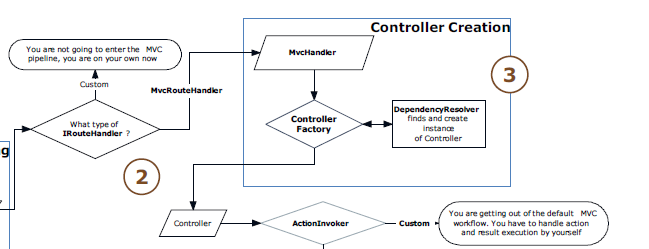
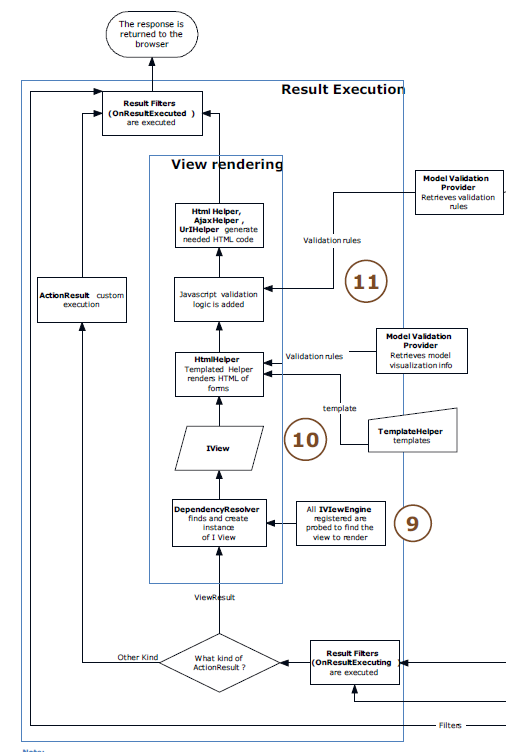
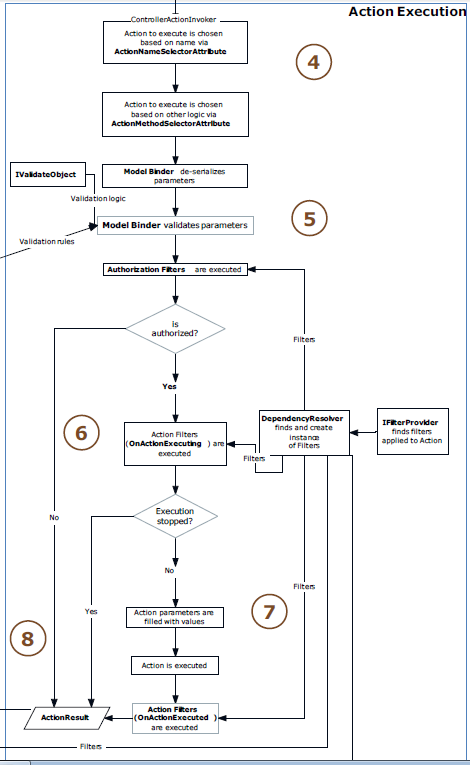
    ASP.NET MVC Extensibility-Internals of Pipeline Requests.

    Today I came across one good reference article in simpletalk. This article gives internal architecture of asp.net pipeline processing for MVC framework. This is something which I always feel was missing in tutorial or documentation site of asp.net. Even the MVC is creating a stir in web development but too less has been revealed in terms of documentation which entails the true story of framework.
    https://www.simple-talk.com/dotnet/.net-framework/an-introduction-to-asp.net-mvc-extensibility/

    At a very high level, the lifecycle of a request in ASP.NET MVC is:
    • The browser sends the GET or POST HTTP request;
    • The request is inspected and routed to the right controller and the right action;
    • The action collects or creates the data that needs to be returned to the browser;
    • This data is passed to the view that renders the response, which is sent back to the browser.


    Wednesday, August 21, 2013

    DataType Conversion in MVC Razor

    The following table lists some common conversion and test methods for variables.
    MethodDescriptionExample
    AsInt(),
    IsInt()
    Converts a string that represents a whole number (like "593") to an integer.
    var myIntNumber = 0;
    var myStringNum = "539";
    if(myStringNum.IsInt()==true){
        myIntNumber = myStringNum.AsInt();
    }
    AsBool(),
    IsBool()
    Converts a string like "true" or "false" to a Boolean type.
    var myStringBool = "True";
    var myVar = myStringBool.AsBool();
    AsFloat(),
    IsFloat()
    Converts a string that has a decimal value like "1.3" or "7.439" to a floating-point number.
    var myStringFloat = "41.432895";
    var myFloatNum = myStringFloat.AsFloat(); 
    AsDecimal(),
    IsDecimal()
    Converts a string that has a decimal value like "1.3" or "7.439" to a decimal number. (In ASP.NET, a decimal number is more precise than a floating-point number.)
    var myStringDec = "10317.425";
    var myDecNum = myStringDec.AsDecimal(); 
    AsDateTime(),
    IsDateTime()
    Converts a string that represents a date and time value to the ASP.NET DateTime type.
    var myDateString = "12/27/2012";
    var newDate = myDateString.AsDateTime();
    ToString()Converts any other data type to a string.
    int num1 = 17;
    int num2 = 76;
    // myString is set to 1776
    string myString = num1.ToString() +
      num2.ToString();

    Tuesday, August 20, 2013

    Make MVC @helper in more organized way

    Step 1 : On The Project Create a New Director App_Code
    Step 2 : To App_Code Directory Add a New Razor View Page Name It Content.cshtml
    Step 3 : Paste The Helper , Here You can see the Code Modifications 

    Content.chtml

    @using System.web.mvc;

    @helper GenerateHTMLString(string val)
    {
     

    val


    }

    http://mvc4beginner.com/Tutorial/MVC-Best-Practice-Managing-Scripts.html
     

    Output caching in MVC


    Disable MvcHandler.DisableMvcResponseHeader = true

    We should place it somewhere to be executed within the Application_Start method. Additionally it makes sense to disable writing the standard MVC response header. Adding specific headers to the response is actually kind of a security issue (not a big one), since we are telling other people about the implementation of our system (here one could spy that obviously ASP.NET MVC is used).

    MvcHandler.DisableMvcResponseHeader = true;
    This leaves our web app behind with optimized headers .
    http://www.codeproject.com/Articles/419054/Practical-ASP-NET-MVC-3-tips

    http://www.codeproject.com/Articles/635324/Another-set-of-ASP-NET-MVC-4-tips#tip-01

    Precompiled Your MVC View with MVCBuildView Option

    The mvc razor view are non compiled markup with code behind interleaved. You'll come to know about your Razor view errors of c# only at runtime. This is area of concerns when you deployed your code in production and you're not sure if this works as expected even though look alike testing has been conducted in staging or UAT environment.
    Well I'm sure we'll see this improvement in coming version of MVC framework where we will be having compile time/built time errors in IDE itself.

    Now to our rescue a work around.

    true in the .csproj.

    See http://www.dotnetcurry.com/ShowArticle.aspx?ID=698 for more details.

    http://haacked.com/archive/2011/05/09/compiling-mvc-views-in-a-build-environment.aspx

    http://geekswithblogs.net/Aligned/archive/2013/05/28/pre-compiling-your-mvc-views.aspx

    Tuesday, August 6, 2013

    Visual Studio Magazine's Moving from Partial Views to AJAX Calls

    This is one of the good example of replacing partial view and load them dynamically using Jquery Ajax.
    There can be scenario where we must be looking at such option.It make use of Embedded Javascript. The article also eloborate on using Json w.r.t backbone.js and knockout.js.

    http://visualstudiomagazine.com/articles/2013/05/01/moving-from-partial-views-to-ajax-calls.aspx?sc_lang=en

    Monday, August 5, 2013

    MVC Repository Design pattern

    Its now quite long time I've been exploring various ways to code in MVC razor and I'm now quite confident to take MVC to next level. I personally feel, I m now an intermediate MVC Razor developer. The only point I was missing till now is to work on more structure architecture concerning to separate responsibility within controller and View. So far I can say I'm able to meet that. Now I can make thin controller and can make more structured and modular pattern within my code component.

    Must suggest to look for repository Design pattern for MVC if you planning to develop any application using it. This is utmost important we follow right pattern and practice right at the beginning of MVC.

    http://www.asp.net/mvc/tutorials/getting-started-with-ef-using-mvc/implementing-the-repository-and-unit-of-work-patterns-in-an-asp-net-mvc-application

    This goes well with IOC and dependency injection if not still you can make use of it at greater extent.

    Happy coding.

    Thursday, August 1, 2013

    MVC- Multiple Views with Display Mode in MVC4

    Another intersting white paper on MVC internals. I m just wanting them to file this references in my blog so that I can revisit them anytime at my leisure. Well If you're following my blogs you'll definately find some cool knowledge references to MVC.

    Discalimer Content taken from below write up to short summary of content given.
    As you know, you should also have a file named index.cshtml located under the Views/Home folder in the project. This file will provide the HTML for the browser. In the body of the Index method above you code (or better, you invoke from other components) the logic required to serve the request. If, by executing this piece of logic, data is produced which needs to be embedded in the view, then you pass this data down to the view object by adding an argument to the View method.

    Now in ASP.NET MVC 4 there’s an extra piece of magic that you might not know about yet. To experience the thrill of it, you add a new file to the Views/Home folder named index.mobile.cshtml. You can give this file any content you like; just make sure the content is different from the aforementioned index.cshtml.

    Read More.

    https://www.simple-talk.com/dotnet/asp.net/multiple-views-and-displaymode-providers-in-asp.net-mvc-4/

    https://www.simple-talk.com/dotnet/.net-framework/an-introduction-to-asp.net-mvc-extensibility/

    MVC Software Design-Convention Over Configuration

    In recent time I was just looking for some interesting topic in MVC and I came across the interesting one. I've been using .net for10 years now but never thought of software design that are carved and paved into whole making of framework. Why I chosen .net its simple to use with no configuration unlike Java platform. More productive gain , can built website /software in less man hour as compare to Java platform. I m making a valid point here. the whole point is .net architecture and framework is based on CoC principle.

    Must read this.
    CoC is analogous to a math axiom—a statement that is accepted as true without requiring proof. A CoC behavior happens because the framework was coded in that way and it does not require any further ad-hoc code or configuration on the developer’s end.

    https://www.simple-talk.com/dotnet/asp.net/asp.net-mvc-controllers-and-conventions/

    MVC - Domain Model vs View Model vs Input Model

    Synopsis Model

    Domain Model- Is also called Entity Model or Data model. Now this domain model represents data entity that are mapped to business domain which later consumes and act as a container for presentation and vice versa.

    View Model- The data are processed or referenced in presentation layer or view finds its place in View Model as a properties. Now these data can be string, data , int etc.

    Input Model- This is rather confusing and we sometimes tends to term it as View Model. But these construct solely based on input data from view by end users to controller and eventually to backend. This is form post or Get or Update/Delete operations.

    The below blog post entails the whole story of domain and give examples around to better understand them.
    Look also for IModelBinder,Custom DefaultModelBinder and DefaultModelBinder.

    https://www.simple-talk.com/dotnet/asp.net/the-three-models-of-asp.net-mvc-apps/

    MVC Post -Redirect-Get PRG Pattern

    Something worth to share.If you've closely watched and noticed the page refresh /page load of MVC web then you have to understand this pattern of Post Redirect and get-ie. PRG pattern. Now once page is loaded it is method Post in which data get processed and routed back to browser. After this if  user hit f5 or page refresh then page is not post back but indeed GET which is again a safe way to load page without being refresh. This is what MVC smartly do and identify the requests.

    https://www.simple-talk.com/dotnet/asp.net/modal-input-forms-in-asp.net-mvc/

    Wednesday, July 31, 2013

    MVC -Performance Improvement-Removed unused ViewEngine-WebFormViewEngine Or RazorViewEngine

    Nicely explained..
    https://www.simple-talk.com/blogs/2013/02/27/tip-2-expanded-remove-unused-view-engines//

    Just to tell long story short...

    Sometimes we referenced View that may not exist in such case MVC framework throws error and specify that it tried to search view in different possible location but they do not exist,

    Say--http://localhost/home
    So View engine will try to search View\Home\index.chtml for source file but if the file don't exists it throws exception listing possible extension and location seach
     WebFormViewEngine
    ~views/home/index.aspx
    ~views/home/index.ascx
    ~views/Shared/index.aspx
    ~views/Shared/index.ascx

     RazorViewEngine
    ~views/home/index.chtml
    ~views/home/index.chtml
    ~views/Shared/index.chtml
    so on.
    ~views/Shared/index.VBhtml

    If we're using only RazorViewEngine then we can get rid of rest of ViewEngine just by adding below lines of code in Global.asax

    ViewEngines.Engines.Clear();
     ViewEngines.Engines.Add(new RazorViewEngine());
     

    MVC -HandleUnknownAction -Avoid Redundant Code Action Method in Controller

    HandleUnknownAction:

    Just overirde Controller Method HandleUnknownAction- Now we can merge redundant method which does the same thing of loading view .Such view does nothing just rendering view. There can be scenario when the action is called but there is no relevant action defined in controller in such case we can override this method to handle unknown calls.

    public class CustomerController : Controller
    {
        public ActionResult Index()
        {
            return View();
        }

        public ActionResult Details()
        {
            return View();
        }
       
        public ActionResult Help()
        {
            return View();
        }
    }

    Just overirde Controller Method HandleUnknownAction- Now we can merge redundant method which does the same thing of loading view .Such view does nothing just rendering view. There can be scenario when the action is called but there is no relevant action defined in controller in such case we can override this method to handle unknown calls.

    public class CustomerController : Controller
    {
        protected override void HandleUnknownAction(string actionName)
        {
            this.View(actionName).ExecuteResult(this.ControllerContext);
        }
    }

    MVC Internal Controller Action Method with No View with No direct Browser Access

    Sometimes we would like to call controller action method from View without the method completely tied to view. What I mean is direct browser access such as http://localhost/Home/GetCustomer/2
    Now we have scenario where we want such action method to rendered partial view using html.action() that in turns calls Action method in controller. For such cases we have [ChildOnlyAction]attribute.

    View-> html.action -> Calls Action Controller -> loads partial view

    [ChildOnlyAction]
    public ActionResult CanOnlyBeCalledInternalByView()
    {

        return PartialView();
    }

    Avoid MVC Open Redirection attack

    Open Redirection attack


    Sample URL.
    Scenario 1: Normal Login process
    The first address, redirects users to the Home/Index after successful Login

    1. http://www.codingtips.net/Account/login?ReturnUrl=/Home/Index

    Scenario 2: Hacked /Tampered URL.
    The second address redirects users to the Unknown website, it means the second address is manipulated by the hackers.

    2. http://www.codingtips.net/Account/login?ReturnUrl=www.UnknownSite.com

    Remedy: Prevent URL redirection to unknown site. If URL tampered it will always return to home page.

    private ActionResult Redirect(string returnUrl)
            {
                if (Url.IsLocalUrl(returnUrl))
                {
                    return Redirect(returnUrl);
                }
                else
                {
                    return RedirectToAction("Index", "Home");
                }
            }


    Tuesday, July 30, 2013

    Glimpse A cool profiling Tool for MVC by Nuget Package.

    Next time you want a quick profiling tool with trendy looks ,indeed a useful snoop watch dog, then your search ends here. We've Glimpse to give more ...all you need to do is

    1. Go to VS2012

    2. Click on tools-Library Package Manager

    3. Console Appears-Type Install-package Glimpse.MVC4

    4. Profiler is installed for you.

    Get Started: How?

    Use website url say for e.g http://sample/Glimpse.axd

    Click on Glimpse enable button.

    Browse your site as usual http://sample and you will find small icon of Glimpse tool tip appears.

    Click on icon you see the petty performance profiler stats. Isn't that cool!

    Here is the Hub...

    http://www.nuget.org/packages/Glimpse.Mvc4/1.3.0


    Thursday, July 25, 2013

    Customize MVC Folder Structure


    MVC Architecture comes with its own predefined folder structure and its engine operates only when class is added in respective folder such as controller, model or View. Sometimes it becomes unmanageable  when we’ve large set of source files and views that are required to be maintained. We’ve a workaround by which we can defined our own folder structure. Here I demonstrated partial view scenario where we can have our designed folder for partial view .chtml in place of Shared folder view. To achieve this, just extend [RazorviewEngine] class and add this class file in{ Model/ACARazorViewEngine }and instantiate it in Global.asax- application_start event.


    Step 1- Add ACARazorViewEngine in Model


    using System;

    using System.Collections.Generic;

    using System.Linq;

    using System.Web;

    using System.Web.Mvc;

    namespace SampleWeb

    {


        public class ExtentRazorViewEngine : RazorViewEngine

        {

            public ExtentRazorViewEngine ()   

            {       

                var newLocationFormat = new[]                                   

                {      "~/Views/PartialViews/StaticUCS/{0}.cshtml",

    "~/Views/PartialViews/Dialoq/{0}.cshtml"          

                };       

                PartialViewLocationFormats = PartialViewLocationFormats.Union(newLocationFormat).ToArray();   

            }


        }


    }

    Step 2: Instantiate the View Engine

      public class MvcApplication : System.Web.HttpApplication

        {

            protected void Application_Start()

            {

                ViewEngines.Engines.Add(new ACARazorViewEngine());

            }

        }


    Wednesday, July 3, 2013

    Cross orgin Resource Sharing CORS now is dynamic MVC5 and VS2013 review release.

    The enhancement to decisively include CORS configuration dynamically will prove to be good move in new release of .net framework. Yes, the resource sharing across different services such twitter, facebook and many more. Its a way to allow resource across domain depending upon the level of interaction. The point is not to narrate many things here. To keep discussion short and up to point. VS2013 and MVC5 preview release has gotten into new innovation to configure CORS dynamically.

    Highlights we can have:
    Now we can configure CORS via database . No require to restart service. Client access can be configured at runtime.


    public interface ICorsPolicyProvider
       7:      {
       8:          /// 
       9:          /// Gets the .
      10:          /// 
      11:          /// The request.
      12:          /// The cancellation token.
      13:          /// The .
      14:          Task GetCorsPolicyAsync(HttpRequestMessage request, CancellationToken cancellationToken);
      15:      }
     
    Important Attributes that can be applied to controller methods.
     
     
    [EnableCors("*", "*", "*")]
    [DisableCors]
     
    For more details check this out. MSDN Blog
     

    Friday, June 28, 2013

    WCF Performance Engineering.

    It starts with converting a specification into running model and then time passes, gradually with many changes the system becomes cumbersome due huge data .Time comes when system start falling apart. We try to cut corners where things needs changes end up doing something very worse. Well to cut long story short..Here I m talking about the performance improvement that requires revisit and too be looked very carefully. I have been working with the team where they faced issues related to time out, memory leakage or stack overall etc. These all boils down to design which is not profound or not taken factors such as performance, scalability, security etc. But to get these factors in place there is trade-off between them.

    Quick Key factors that we should look at high level.
    1. Check the design has chatty communication. Too many server calls, wcf calls via sql DB calls. etc..
    Reduce them bulk calls if possible.

    2. Check the IIS level configuration such as App Pool Overlap recycle, worker processor thread, etc.
    http://msdn.microsoft.com/en-us/library/ee377050.aspx
    3. First more most thing, do profiling of code, optimize code that is there.

    3. BasicHttpBinding vs WShttpBinding
    Check your design and end objective choose among them appropriately.

    4. Check for WCF throttling. ConcurrentInstance, Concurrentsession and ConcurrentRequest.

    http://blogs.msdn.com/b/distributedservices/archive/2010/03/23/wcf-services-appear-hung-due-to-maxconcurrentsessions-limit-being-hit.aspx

    http://blogs.msdn.com/b/wenlong/archive/2009/02/08/why-only-two-concurrent-requests-for-load-testing.aspx

    http://blogs.msdn.com/b/rickrain/archive/2009/06/26/wcf-instancing-concurrency-and-throttling-part-3.aspx

    http://msdn.microsoft.com/en-us/library/vstudio/hh323713(v=vs.100).aspx


    maxConcurrentInstances="200" maxConcurrentSessions="200" />