Monday, July 21, 2014

AngularJS : Controller Factory Service Example

The sample below code demonstrate use of factory with controller and how we can share data among controllers.

Html Output

Controller A

{"color":"Seal"}

Seal


Controller B

{"color":"Seal"}

Seal


<html data-ng-app="app" id="ng-app" lang="sv">

<head>

<title>Customer App</title>
</head>

<body>
 

<div data-ng-controller="oControllerA">

<h1>Controller A</h1>

<h2>{{dataObject}}</h2>

<h3>{{dataObject.color}}</h3>

<input type="text" data-ng-model="dataObject.color" />

</div>

<div data-ng-controller="oControllerB">

<h1>Controller B</h1>

<h2>{{dataObject}}</h2>

<h3>{{dataObject.color}}</h3>

<input type="text" data-ng-model="dataObject.color" />

</div>
</body>

</html>

CustomerController.js


var app = angular.module('app', []);

app.factory('ShareService', function () {

return {

dataObject: { color: "Seal" }


}

});
 
app.controller('oControllerA', ['$scope', 'ShareService', function ($scope, ShareService) {


$scope.dataObject = ShareService.dataObject;

}

]);
 
app.controller('oControllerB', ['$scope', 'ShareService', function ($scope, ShareService) {


$scope.dataObject = ShareService.dataObject;

}

]);


Friday, July 18, 2014

Http.sys Cache · UriScavengerPeriod. Default value: 120 seconds.

· UriScavengerPeriod. Default value: 120 seconds.

Important Registry Setting for production IIS web server environment.
HKEY_LOCAL_MACHINE\System\CurrentControlSet\Services\Http\Parameters


Below description do not belong to me..

I referred below blog :
http://performance-expert.blogspot.se/2012/06/high-performance-websites-stanford.html

The http.sys cache is periodically scanned by a scavenger, and entries that are not accessed between scavenger scans are removed. Setting the scavenger period to a high value reduces the number of scavenger scans. However, the cache memory usage might increase because older, less frequently accessed entries can remain in the cache. Setting the period too low causes more frequent scavenger scans, and it can result in too many flushes and cache churn

IIS Performance Tuning : allowSubDirConfig="false"

As a best practice , never allow nested web.config for single website. Avoid using multiple web.config as applicationhost.config try to make traversal search to locate web.config. As a best practice there should be one web.config.

Changes in Applicationhost.config 


Remove unnecessary module such windows authentication , if web site is open to all web users.

TCP Stack Tuning- MaxUserPort Registry

Increase Concurrent Request - Ports per IP Address.

Environment IIS 8.0 + Windows 2012 R2
*       
Type Win + R Run Command
Type Regedit

HKEY_LOCAL_MACHINE\System\CurrentControlSet\Services\Tcpip\Parameters\MaxUserPort
If MaxUserPort not exists, create this to fine tune the TCP port.
Windows create 5000 port connections for 1 IP address. We can increase this size upto max value=65,534
This will ensure maximum concurrent connections requests are served by the web server. Also try to fine tune the website connection limit in website advanced settings  and queue length in application pool.
http://social.technet.microsoft.com/Forums/en-US/69449ce9-ea58-48ec-b675-c55480ba4bbb/windows-server-2012-and-tcpip-maxuserport?forum=winserverPN
 

Thursday, July 17, 2014

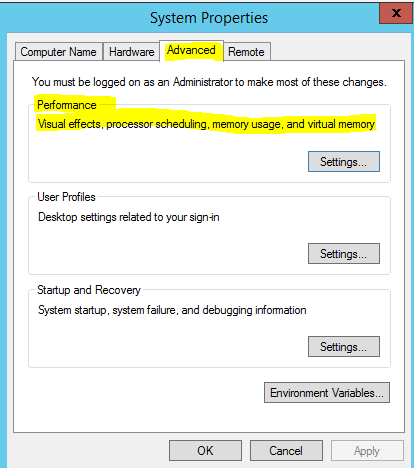
IIS 8: Production Web Server sysdm.cpl System Properties

  1. WIN+R, Run
  2. Type sysdm.cpl into the Run box, and hit Enter.
  3. Below Setting and configuration must be perform to boost your server performance.
  4. Background Service Option
  5. Adjust for best performance.
  6. You can also check Virtual memory- paging - Not covered in this blogpost.
  7.  


  8.  

IIS 8 : Configure OS Level Web Server Optimization

If the given web server is in production and we want to increase the throughput reduce resource utilization and memory consumption. We must then closely look into below service and disabled them if not require.

  1. Win+R Run command
  2. Type  Services.msc
SERVICE NAME
DESCRIPTION
Application Experience
This is application level cache such as office and other application.
Distributed Link Tracking Client
Sharing across network and system
IP Helper
Depend on whether we using IPv4 or IPv6
Network List Service
List network level connected resource
Print Spooler
Printer option
Remote Registry
Enable access of registry remotely
Secondary Logon
Enables additional logon credential for services. Depends.

By disabling above services will save memory and CPU processing cycle.


Reference Book:
Professional Microsoft IIS 8


Encryption and decryption in powershell


Encryption:


·         PS C:\> read-host -assecurestring | convertfrom-securestring | out-file C:\cred.txt


Decryption:


·         $PlainTextPassword= [Runtime.InteropServices.Marshal]::PtrToStringAuto([Runtime.InteropServices.Marshal]::SecureStringToBSTR( (ConvertTo-SecureString $credential.Password) ))


URLScan Is Now- Request Filtering in IIS 8.0 and higher

I've been using URL scan to deny Verbs- Http Method such as put, trace and so on. I remember we used to restrict file extension URL requests that are reaching to web server . These are all part of security practices and also helping right request served by the web server.

Cool Tip- If you want to prevent directory browsing. Go to run-> inetmgr-> select request filtering -> select URL tab-> select Deny Sequence --> input two dot (period) operator or character.

To test this try to access the website resources such as www.sample.com/images/demo.jpg
It will throw error.


http://www.iis.net/configreference/system.webserver/security/requestfiltering

Some Common Development Mistakes.

This is a design flaw or something which is missed at times when we work on coding for some module.

Problem Statement: There is a batch jobs which keeps polling data and sends out notifications for given status of work flow. Now due to some error for given data , code breaks and job terminates and stop sending notifications.

Solution Statement: The most common problem here is unhandled code for given scenario. Just imagine you have complex number crunching algorithm and divide by zero is not handled- catch hence execution flows stop at place where it encounter the denominator with zero values. This is simple scenario and one must think this should be handled but when it comes real world scenario where we have lot of framework, best pattern and layered architecture such flaws are sometimes missed as part of review and assessment. This is something which could probably identified during testing phase- A bug.


Wednesday, July 16, 2014

Powershell -Internet Explorer Web Automation

$ie = New-Object -com "InternetExplorer.Application"
$ie.Navigate("https://www.google.se/?gfe_rd=cr&ei=TDPGU7PmGofK8geauYCoDg")
$ie.visible = $true
do { sleep 5 }
while ( $ie.busy )
$doc = $ie.document
$search = $doc.getElementById("gbqfqwb")
$search.value = "yourUserName"


$doc.getElementById("gbqfba").click();
$ie.Quit();

Hot picks for SEO

To improve site ranking and better SEO.. using following tips:-
  1. robots.txt Block and Allow pages
  2. sitemap- Parameter Driven URLS-Help spider and web Crawler know your webpage hence better indexing.
  3. nofollow
  4. 301 redirect vs 302 redirect
  5. Canonicalization
  6. Footer Links
  7. Images with Alt attribute hmmm
  8. Html Headings (H1-h6)
  9. Title Tag
  10. Meta Keywords
  11. Meta Descriptions 
Where to start:-
 
Book Reference:
Search Engine Optimization (SEO) Secrets

Monday, July 14, 2014

How do I manage website Traffic?

Its a search engine web crawler that most optimistically keep reading resources from our website in form content information. This way it adds up to server load w.r.t to actual regular users. Hence sometimes there is additional load on server due to search engine keeps requesting information.
We can smartly manage or load balanced these traffic with good use of robot.txt, sitemaps and bandwidth throttling.

By using above set of module we can channelized the given traffic and keep updated or educated search engine about our site resources for better search and right information.

To prevent bots from reading unnecessary contents are as follows:-
  1. Images, JavaScript, CSS, layout file
  2. Registration page.
  3. Search Results
  4. .zip,.avi,.docx,.pptx and so on
  5. Pages- that needs- authentication and authorization.
Some examples; user-agent can be browser, search engine..

Disallow access to Images

User-agent: *
Disallow: /images/

Exclude Google Image Search

User-agent: Googlebot-Image
Disallow: /


Why Site Maps for SEO Search Engine Optimization?

Site maps by definitions are list of all URLS that exists for the given sites. It is an XML file that gives information about URLs content last modified, relative priorities and frequency at which content changes. Search Engine Optimizer- SEO can read this site maps based on the information provided it revisits sites and help in ranking of web pages and urls.
With this even we can help SEO instruct not to visit or read URLs if content of particular page has never undergone change.
Site specifications can be found online http://www.sitemaps.org/
Protocol:


<url set xmlns="http://www.sitemaps.org/schemas/sitemap/0.9">

   <url>

     <loc>http://www.example.com/


      <lastmod>2005-01-01       <changefreq>monthly     <priorit>0.8


There are tools online that generates sitemaps for you.

There are two ways to submit the sitemaps to Search Engine.
1. We can use Robot.txt where we can references site maps as given below. In this way search engine web crawler can read about sitemaps in robot.txt file
sitemap: http://www.worldisnotenough/sitemaps/sitemap.xml.gz

2. We can directly feed our site maps into search engine. such e.g is webmaster tools for google search engine.

Thursday, July 10, 2014

IIS8.0 Asp.net Warmup

    AddRoleFeature
  1. Introduction
  2. Prerequisites
  3. Create Your Warmup Script Assembly
  4. Application Pool: Demo Website
  5. IIS Web Server: Configuration Editor
  6. system.applicationHost/applicationPools
  7. system.applicationHost/ServiceAutoStartProviders
  8. system.applicationHost/Sites
  9. Application Initialization
  10. Final Step: Now Run this animal
  11. Reference

Introduction

I've been working on IIS asp.net warm up thing for quite sometime and I tried all possible ways to get my warm up script working but it failed to initialized and auto start. After spending some time understanding some of the flow and internal mechanism of request flow, we able to crack the solution. This article will somewhat help you find the resolution to most common problem that we may have to tackle when enabling warmp script in IIS. I started looking few articles around IIS7.5 and auto start app pool but hardly find the resource online to give me crisp and clear steps to enable this.The overall intent of this article is to provide the end to end steps and some known issues that one would run into.There is sample demo code one can download to setup warmup thing for your website. I haven't gone to extend to explain why we need IIS asp.net warmup however I covered the most likely configuration settings that would go into running the warm up script.

Prerequisites

The Application Initialization feature requires IIS 8.0 to be installed. In addition, the Application Initialization feature within the IIS "Application Development" sub-feature needs to be installed. The following screen shot from the Windows Server 2012 Server Manager UI shows the Application Initialization feature. IIS 8.0 Application Initialization Setup Key Note: Restart server to effect above changes. This initialization plays important role when we have to execute any startup page automatically without users access any web pages. Sometimes warmp up fails to start because there is some setting that needs to be enabled under [code] applicationInitialization[/code]


Create Your Warmup Script Assembly


This warmp script will be executed at the start up of IIS app pool recylce or at time of website initialization. There can be various scenario we can embed in this start up script.Like we can have warm up script for Caching web pages or getting ready canned reports or any heavy task which takes longer time to load.For demo purpose I kept the code setup simple, to just create folder + file. Remember never have such filesystem read write operation withing website virtual directory or website directory it results in application app pool recycle everytime the filewrite operation takes place.

Application Pool: Demo Website

Enable Start Mode="Always running" from OnDemand Mode


IIS Web Server: Configuration Editor

Go to Main Application IIS Root. select Configuration Editor. Changing applicationhost.config is much safer through configuration editor than doing it manually.

system.applicationHost/applicationPools

Click on collection to proceed. Ensure highlighted property are set as given below in the screenshot.

Check AutoStart mode=true

Check StartMode mode=AlwaysRunning

system.applicationHost/ServiceAutoStartProviders

Click on collection to proceed. Ensure highlighted property are set as given below in the screenshot.


Add Assembly and class reference warmup script pacakage in ApplicationHost.config ServiceAutoStartProviders tag. We've indicated this provider with name say PreWarmUpMyCache- Mind it- MY. Next we need to provide this reference to site tag in configuration as next step. Remember type=Assembly Full Name.ClassName,Assembly Full Name


system.applicationHost/Sites

Click on collection to proceed. Ensure highlighted property are set as given below in the screenshot.
Set ServerAutoStart=true

Set preLoadEnabled=true
Set serviceAutoStartEnabled=true
Set serviceAutoStartProvider=PreWarmUpMyCache


Application Initialization

Troubleshooting 1:Ensure your assembly is compiled and exists in bin folder of website.
Troubleshooting 2:Worst case even if warmup script not called ,try including default web page access auto initialize.Refer screenshot.

Final Step: Now Run this animal

Sample Code is attached for demo purpose. Download it and apply above setting to test run the demo.

References

IIS Auto Start Warm up By Scott Guthrie IIS Tech net


Wednesday, July 9, 2014

Concurrency Visualizer for Visual Studio 2013

If you're very much into asynchronous code execution and extensively using task parallel library. You much download this VS 2013 Add on.

http://visualstudiogallery.msdn.microsoft.com/24b56e51-fcc2-423f-b811-f16f3fa3af7a

C# Code Tips: Custom Iterator- Yield and Ienumerable

// A generic method to transform one sequence into another:
delegate Tout Action(Tin element);


IEnumerable Transform(IEnumerable list, Action method)

{
foreach (Tin entry in list)

yield return method(entry);


}


public IEnumerable<string> GetCustomerDetails()


{

var customerList =GetCustomerList();
return Transformstring>(customerList,

delegate(Customer item)


{
return CreateCustomerReport(item.CustomerID, item.CustomerName, item.CustomerAddress);


});

}

HttpClient Vs WebClient- WebRequest /WebResponse

Its a bit of discussion as to use what ,when and how.


WebClient- Old .net framework

Most recently I used webrequest and Webresponse to read content of web pages like this.


using System.Net.Web


WebRequest request = WebRequest.Create(http://localhost/demosite);

// If required by the server, set the credentials.

request.Credentials = CredentialCache.DefaultCredentials;

// Get the response.

WebResponse response = request.GetResponse();

// Get the stream containing content returned by the server.

Stream dataStream = response.GetResponseStream();

// Open the stream using a StreamReader for easy access.

StreamReader reader = new StreamReader(dataStream);

// Read the content.

string webResponseStream= reader.ReadToEnd();

reader.Close();

HttpClient: .net 4.5 more aligned to http web api.

using System.Net.Http;
Msdn  : Provides a base class for sending HTTP requests and receiving HTTP responses from a resource identified by a URI.
 
 
One can initiate request related to GET, POST, PUT method using httpClient.
Example:http://www.dotnetperls.com/httpclient

static async void DownloadPageAsync()
    {
// ... Target page. string page = "http://en.wikipedia.org/"; // ... Use HttpClient.
using (HttpClient client = new HttpClient())
using (HttpResponseMessage response = await client.GetAsync(page))
using (HttpContent content = response.Content)
{
    // ... Read the string.
    string result = await content.ReadAsStringAsync();

    // ... Display the result.
    if (result != null &&
result.Length >= 50)
    {
Console.WriteLine(result.Substring(0, 50) + "...");
    }

Comparison
http://blogs.k10world.com/technology/webclient-httpclient-consume-http-requests/