Showing posts with label azure. Show all posts

Monday, May 26, 2025

Azure Application Gateway vs Azure Traffic Manager

 Azure Application Gateway and Azure Traffic Manager are both load-balancing solutions in Azure, but they serve different purposes and operate at different layers of the network stack.


🔍 Quick Comparison

Feature Application Gateway Traffic Manager
Network Layer Layer 7 (Application layer, HTTP/HTTPS) Layer 4/7 (DNS-based redirection)
Load Balancing Method Reverse proxy DNS-based redirection
Use Case Load balance within a region Route traffic across regions
Protocol Support HTTP, HTTPS (Web traffic) Any protocol (DNS-based, so protocol-agnostic)
Geographic Routing ❌ (single region only) ✅ (multi-region and geo-based routing)
SSL Termination ✅ Yes ❌ No (doesn't touch actual traffic)
Web Application Firewall ✅ Built-in WAF ❌ No
Health Probing ✅ Application-level (URLs, HTTP status) ✅ Endpoint-based (simple HTTP checks)
Sticky Sessions / Affinity ✅ Yes ❌ No
Multi-region Failover ❌ No (used per region) ✅ Yes
Custom Domain Routing ✅ Path-based & domain-based ✅ Domain-based only (via DNS)

🛠️ When to Use Each

Use Application Gateway when:

  • You need layer 7 load balancing within a single Azure region.

  • You want to do SSL termination, cookie-based session affinity, or URL/path-based routing.

  • You want to use Web Application Firewall (WAF).

  • You’re deploying web apps (e.g., in App Services, VMs, AKS) behind a reverse proxy.

Use Traffic Manager when:

  • You want to route users to the closest or healthiest Azure region (e.g., for geo-redundant services).

  • You need DNS-based global failover or performance-based routing.

  • Your endpoints span multiple Azure regions, or even outside Azure.

  • You're working with non-HTTP services (e.g., SMTP, FTP, custom ports).


🔄 Can They Work Together?

Yes! In a high-availability architecture:

  • Traffic Manager is used to direct global clients to the best region (e.g., East US or West Europe).

  • Each region uses its own Application Gateway to manage and protect internal traffic.

🧭 Diagram:

                    User
                      |
           +---------------------+
           |  Traffic Manager    |
           +---------------------+
             /            \
   [App Gateway 1]     [App Gateway 2]
     (Region A)           (Region B)
         |                   |
    Web Apps/VMs       Web Apps/VMs

🧠 Summary

You want to... Use...
Load balance HTTP/HTTPS traffic in-region Application Gateway
Distribute traffic across regions/globally Traffic Manager
Route by URL or path Application Gateway
Route by region or endpoint health Traffic Manager

Let me know if you want help choosing for your specific architecture or a cost comparison.

Sunday, February 16, 2025

Azure Keyvault secret change notification using Event Grid Subscription and Logic App or Azure function

 To create triggers for changes in Azure Key Vault secrets, you can leverage Azure Event Grid by setting up an event subscription on your Key Vault that will fire an event whenever a secret is updated, deleted, or created, allowing you to then configure an action like a Logic App or Azure Function to respond to these changes. 

Key steps:
  • Configure Event Grid subscription:
    • Go to your Azure Key Vault in the portal. 
    • Navigate to the "Events" tab. 
    • Select "Create event grid subscription". 
    • Choose a suitable Event Grid topic or create a new one. 
    • Select the event types you want to monitor, such as "SecretNewVersionCreated" or "SecretNearExpiry". 
  • Create a consuming application:
    • Logic App: Set up a Logic App with an Event Grid trigger that will be activated when an event is published by your Key Vault. 
    • Azure Function: Develop an Azure Function that is triggered by the Event Grid event and performs the desired actions based on the secret change. 
    Important considerations:
    • Access control:
      Ensure your consuming application (Logic App or Function) has the necessary permissions to access your Key Vault to read the updated secret values. 
    • Filtering events:
      You can filter the events received by your consuming application based on specific secret names or other criteria using Event Grid filters. 
    Example use cases for secret change triggers:
    • Automatic application reconfiguration: When a secret is updated in Key Vault, trigger a deployment to update your application configuration with the new secret value. 
    • Notification alerts: Send notifications to administrators when critical secrets are changed or near expiry. 
    • Data synchronization: Update data in another system based on changes to a secret in Key Vault. 

Friday, February 14, 2025

Azure Naming Convention Tools and Best Practices

When working with Microsoft Azure, a well-defined naming convention is crucial for maintaining clarity, consistency, and efficiency across resources. In this guide, we'll explore best practices for naming Azure resources.

Why is a Naming Convention Important?

Following a structured naming convention helps in:

  • Easy resource identification and management.
  • Improved automation and governance.
  • Enhanced collaboration among teams.
  • Reduced ambiguity and errors.

Key Components of an Azure Naming Convention

Each Azure resource name should contain specific elements to provide clarity. A recommended format is:

[Company/Project]-[Workload]-[Environment]-[Region]-[ResourceType]-[Instance]

Example:

contoso-web-prod-eastus-vm01

Best Practices for Azure Naming

  • Use standardized abbreviations: Example: rg for Resource Group, vm for Virtual Machine.
  • Follow a consistent case style: Lowercase for DNS-related resources, PascalCase or camelCase for others.
  • Include environment indicators: Use dev, qa, prod for different environments.
  • Avoid special characters and spaces: Stick to alphanumeric characters and hyphens.
  • Be concise but descriptive: Keep names readable while following Azure’s length limits.

Common Azure Resource Naming Abbreviations

Resource Abbreviation
Resource Group rg
Virtual Machine vm
Storage Account st
App Service app

Tools to Implement Azure Naming Conventions

  • Azure Resource Graph Explorer: Helps in querying and managing resources efficiently.
  • Azure Policy: Enables enforcement of naming conventions automatically.
  • Microsoft Cloud Adoption Framework: Provides best practices and guidance for cloud governance. Learn More

Conclusion

A well-structured Azure naming convention helps keep your cloud resources organized and manageable. By following these best practices, you can ensure clarity, scalability, and consistency in your Azure environment.

References and Tools

Wednesday, January 15, 2025

Unlocking Innovation with Azure AI Foundry: Transform Your Business with AI

Unlocking Innovation with Azure AI Foundry: Transform Your Business with AI

Introduction In the rapidly evolving digital landscape, artificial intelligence (AI) has become the cornerstone of innovation for businesses worldwide. Microsoft’s Azure AI Foundry stands out as a premier platform that empowers organizations to harness the full potential of AI, enabling them to streamline operations, drive growth, and enhance customer experiences. In this article, we’ll explore the features, benefits, and applications of Azure AI Foundry while optimizing for search engines to help you stay ahead in the AI revolution.

What is Azure AI Foundry? Azure AI Foundry is Microsoft’s comprehensive platform that integrates cutting-edge AI tools, frameworks, and services. Designed for businesses of all sizes, it provides a collaborative environment for building, deploying, and managing AI solutions. The platform leverages Azure’s cloud infrastructure to deliver scalable, secure, and customizable AI capabilities tailored to your organization’s unique needs.

Key Features of Azure AI Foundry

  1. Pre-Built AI Models: Azure AI Foundry includes pre-trained models for natural language processing (NLP), computer vision, and machine learning, reducing the time and effort needed to implement AI solutions.

  2. Custom AI Development: The platform offers tools like Azure Machine Learning for creating custom models that align with specific business goals.

  3. Generative AI Capabilities: Azure AI Foundry enables businesses to leverage generative AI for creating content, designing innovative solutions, and developing creative applications tailored to customer needs.

  4. Consumer-Focused Features: Empower customers with personalized recommendations, voice assistants, and interactive AI experiences for improved engagement and satisfaction.

  5. Developer Tools: Comprehensive development kits, SDKs, and APIs simplify integration and deployment, reducing the technical barrier for developers and enabling faster go-to-market strategies.

  6. Integration Capabilities: Easily integrate AI models into existing applications using APIs and SDKs, ensuring seamless adoption.

  7. Scalability: Azure AI Foundry’s cloud-based architecture ensures that your AI solutions can scale alongside your business growth.

  8. Enterprise-Grade Security: Benefit from Azure’s industry-leading security features to protect your data and AI applications.

  9. AutoML and No-Code Options: Simplify AI development with AutoML tools and no-code interfaces, making it accessible to non-technical users while maintaining advanced functionality.

  10. Collaboration and Insights: Real-time collaboration tools and detailed analytics provide teams with actionable insights to refine AI solutions effectively.

Applications of Azure AI Foundry

  • Customer Service: Improve customer interactions with AI-driven chatbots and virtual assistants.
  • Predictive Analytics: Leverage machine learning to forecast trends and make data-driven decisions.
  • Supply Chain Optimization: Enhance logistics and inventory management with AI-powered insights.
  • Healthcare: Enable precise diagnostics and personalized treatment plans with AI solutions.
  • Retail: Deliver personalized shopping experiences and optimize pricing strategies.

Why Choose Azure AI Foundry? Azure AI Foundry offers a competitive edge by combining robust features with Microsoft’s trusted ecosystem. Whether you’re a startup or an enterprise, the platform’s flexibility and support ensure a smooth AI journey. Key advantages include:

  • Cost efficiency through pay-as-you-go pricing.
  • Access to Microsoft’s AI research and innovation.
  • Comprehensive documentation and community support.

SEO Tips for Leveraging Azure AI Foundry To maximize the visibility of your Azure AI Foundry content, implement these SEO best practices:

  • Keyword Optimization: Use relevant keywords such as “Azure AI Foundry benefits,” “AI solutions with Azure,” and “Azure Machine Learning applications.”
  • High-Quality Content: Provide valuable insights and actionable information to engage readers.
  • Meta Tags: Optimize meta titles and descriptions with targeted keywords.
  • Internal Linking: Link to related Azure and AI content within your website to enhance user experience.
  • Mobile Optimization: Ensure your website is mobile-friendly to improve search rankings.

Conclusion Azure AI Foundry is a game-changer for businesses looking to embrace AI-driven transformation. Its robust features, ease of integration, and scalability make it an ideal choice for organizations aiming to stay competitive in today’s AI-first world. By leveraging Azure AI Foundry and following SEO best practices, you can unlock new opportunities and drive meaningful innovation for your business.

Call to Action Ready to revolutionize your business with AI? Explore Azure AI Foundry today and take the first step toward a smarter future!

Saturday, May 29, 2021

Azure Managed Identities- System Identity vs User Assigned Identity


Managed Identities

Managed Identities are in essence 100% identical in functionality and use case than Service Principals. In fact, they are actually Service Principals.

What makes them different though, is: – They are always linked to an Azure Resource, not to an application or 3rd party connector – They are automatically created for you, including the credentials; big benefit here is that no one knows the credentials

Managed Identities exist in 2 formats: – System assigned; in this scenario, the identity is linked to a single Azure Resource, eg a Virtual Machine, a Logic App, a Storage Account, Web App, Function,… so almost anything. Next, they also “live” with the Azure Resource, which means they get deleted when the Azure Resource gets deleted. – User Assigned Managed Identity, which means that you first have to create it as a stand-alone Azure resource by itself, after which it can be linked to multiple Azure Resources. An example here could be out of an integration with Key Vault, where different Workload services belonging to the same application stack, need to read out information from Key Vault. In this case, one could create a “read KV” Managed Identity, and link it to the web app, storage account, function, logic app,… all belonging to the same application architecture.

Let’s walk through a quick demo scenario for both, using a Virtual Machine as Azure Resource:

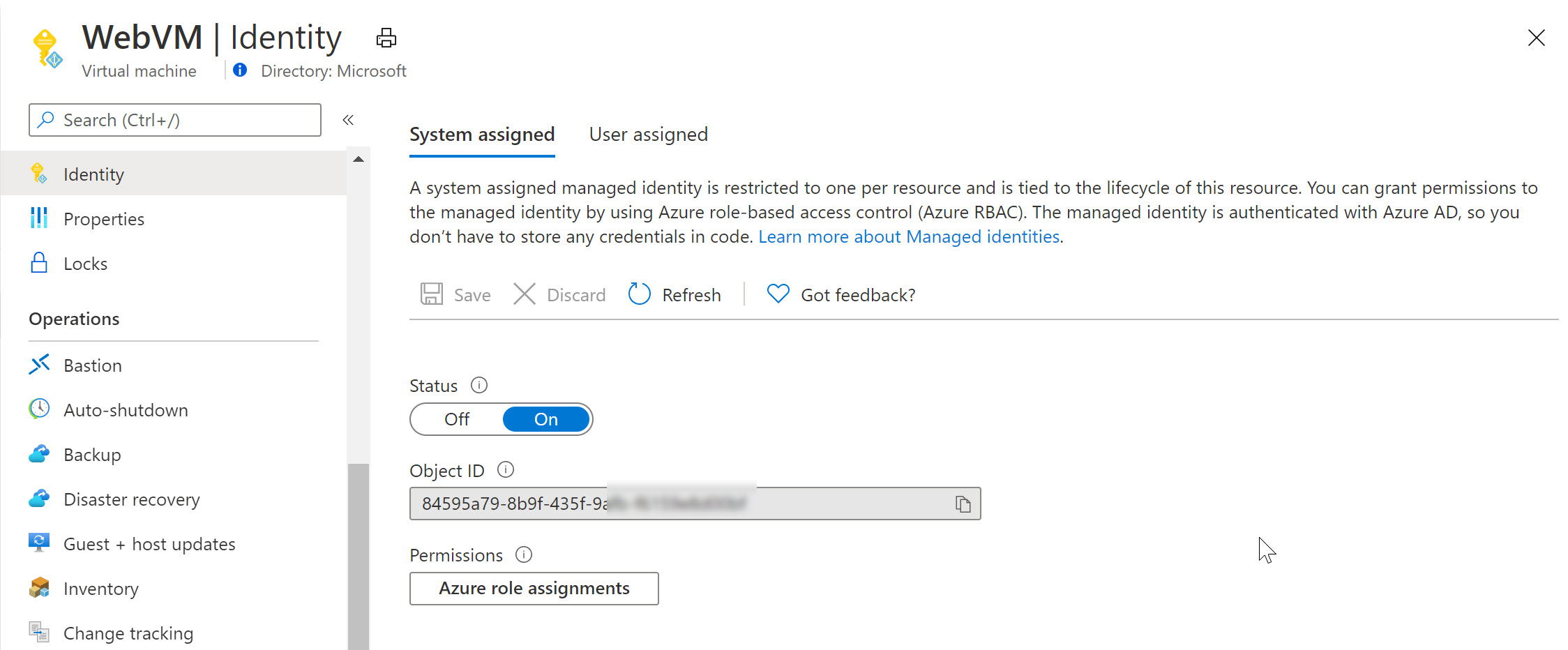
  • From the Azure Portal, select the Virtual Machine; under settings, find Identity
  • Set Status as On, and save the changes

System Assigned

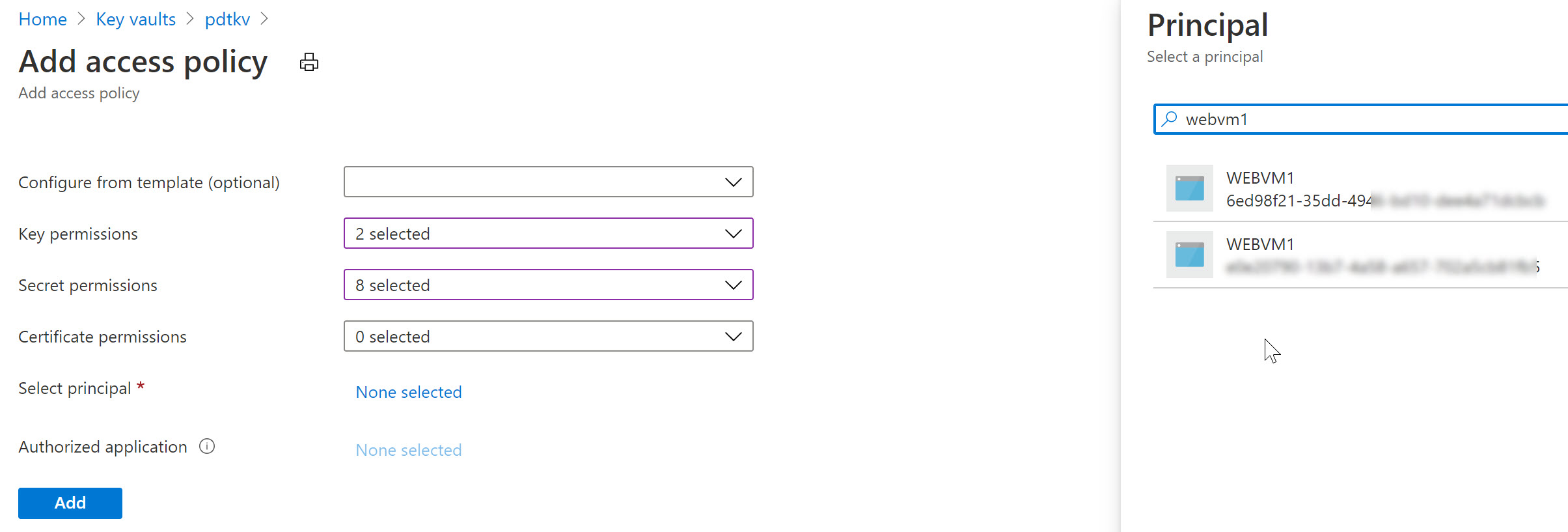
Switching to Azure Key Vault / Access Policies, we can now define this System Assigned Managed Identity having get and list permissions (or any other) for keys, secrets or certificates. For example reading out an Azure Storage Account Access key or similar.

Notice how Azure Key Vault is expecting a Service Principal object here (where in reality we are using a Managed Identity).

Access Policy

Similarly, let’s remove the System Assigned MI of the VM and use a User Assigned one in the next example (an Azure Resource can only be linked to one or the other, not both…):

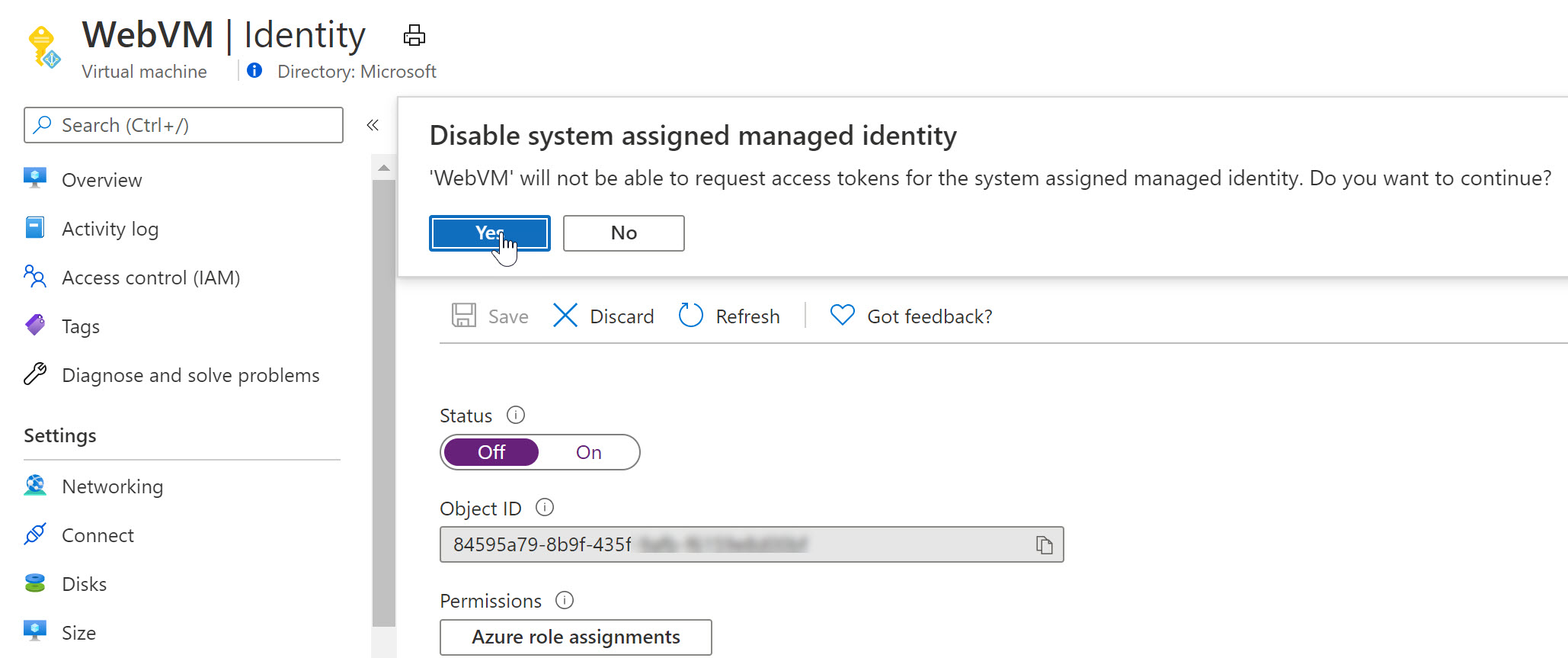
  • From the Azure Virtual Machine blade, navigate to Identity and switch the “Status” toggle button to Off.
  • This will prompt for your confirmation when saving the settings

Confirmation

As you notice, the Managed Identity object gets immediately removed from Azure AD. Yes, security is key here…

  • Wait for the deregistration of the object.

Remember that a User Assigned Managed Identity is a stand-alone Azure Resource, which needs to be created first, after which you can assign it to another Azure Resource (our VM in this scenario).

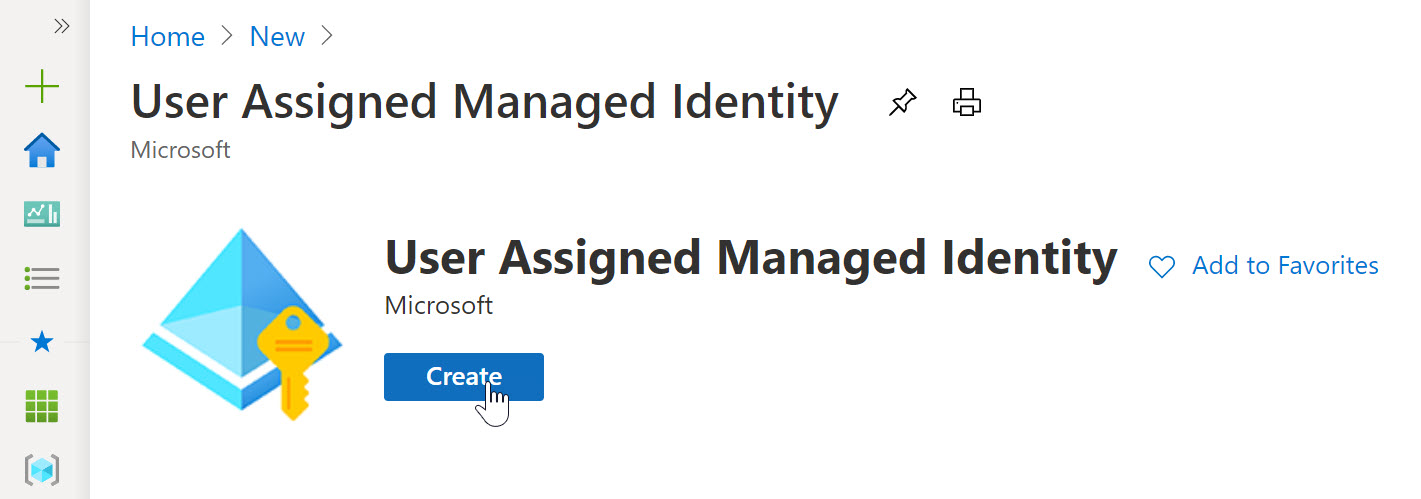
  • From the Azure Portal, Create new Resource, and search for “User Assigned Managed Identity”

User Assigned

  • click Create.
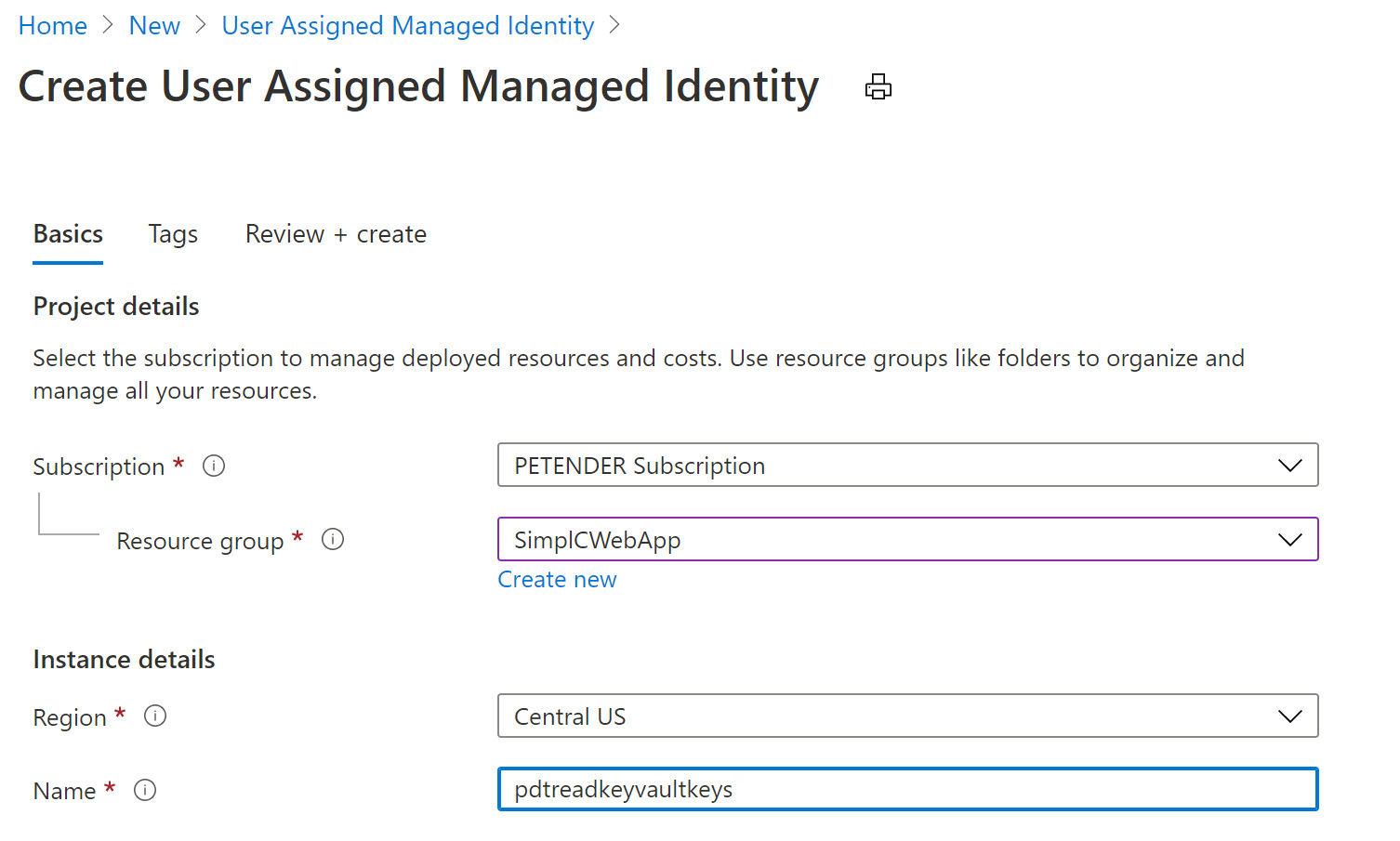
  • Specify the Resource Group, Azure Region and Name for this resource.

User Assigned

  • Confirm by clicking create and Wait for the resource creation to complete successfully.
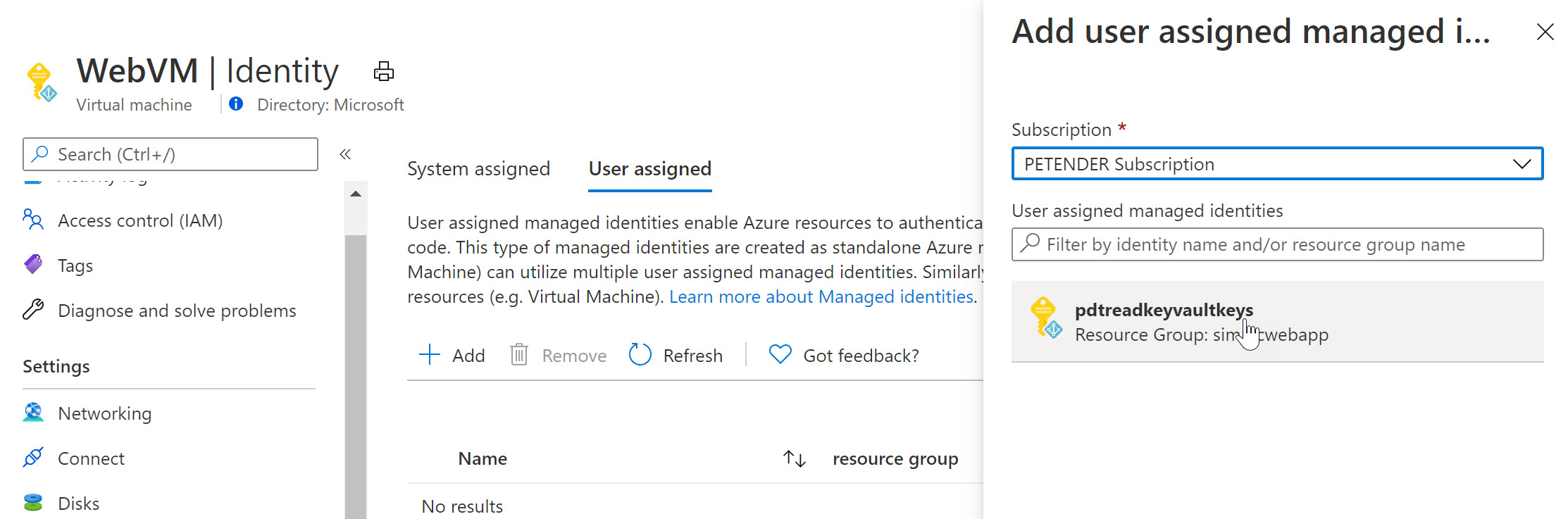
  • Once created, switch back to the Azure Virtual Machine, select Identity and select User Assigned
  • Notice the Managed Identity you just created.

User Assigned

  • Select it and add it as a Virtual Machine User Assigned object.

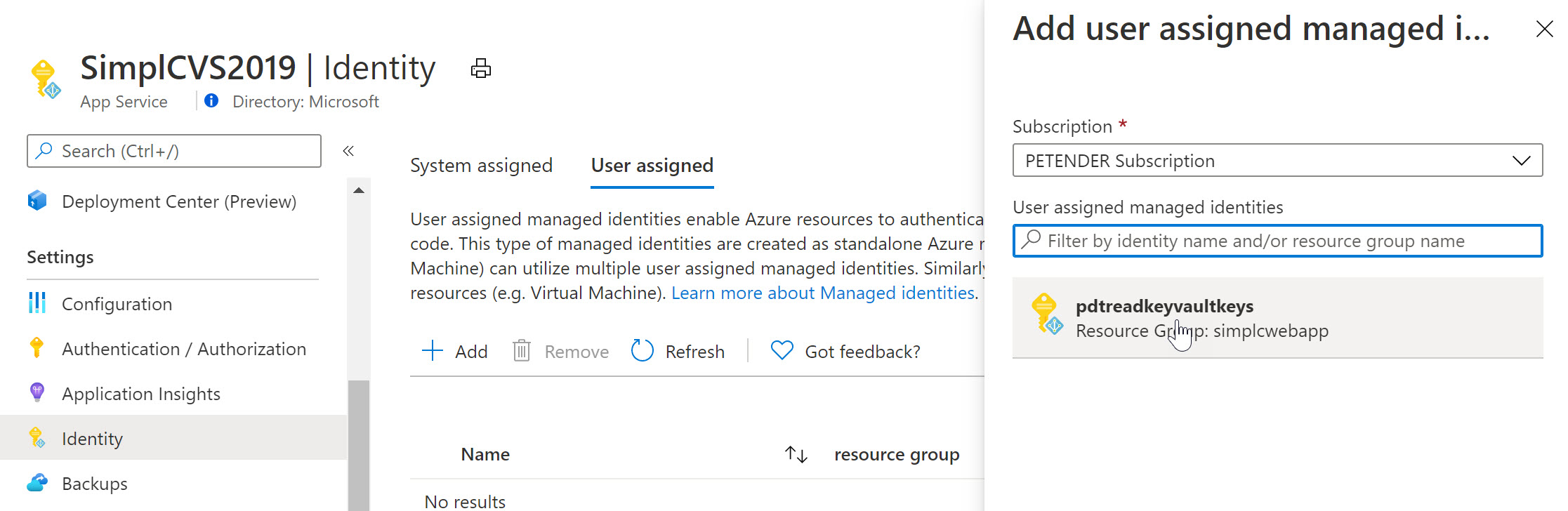
  • Select another Azure Resource in your subscription, for example an Azure Web App, Logic App,… and once more select Identity from the settings. Below screenshot shows what it looks like for an Azure Web App Resource:

User Assigned

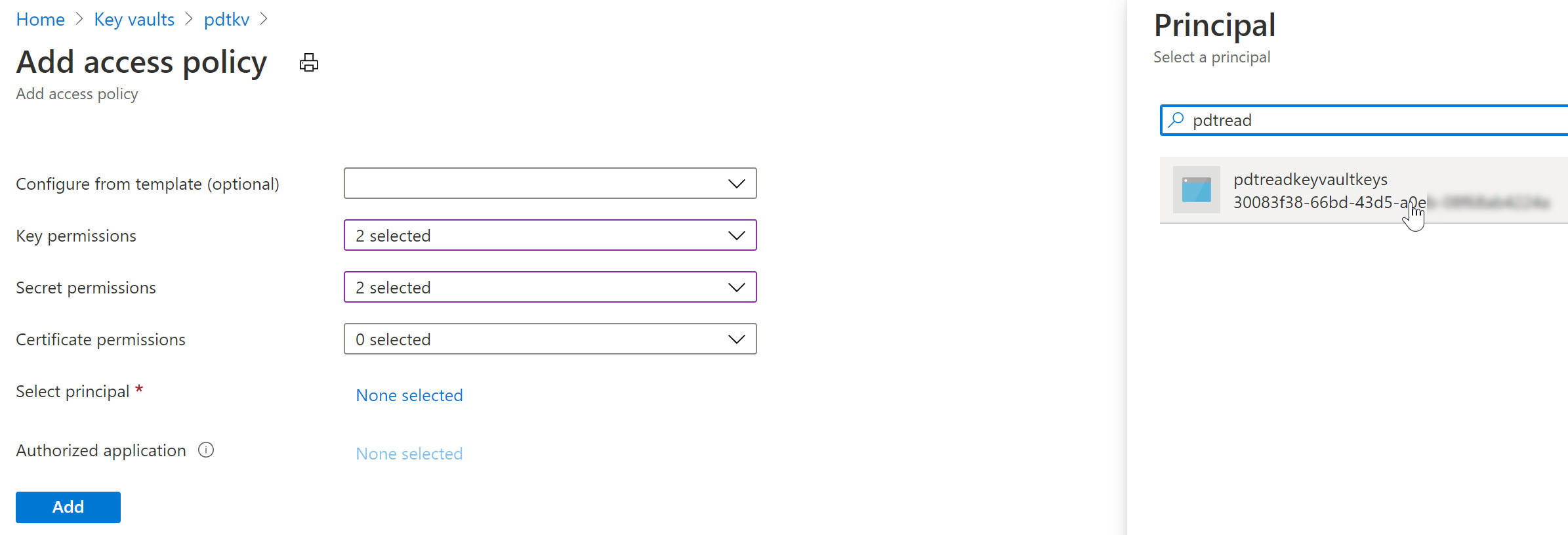
To complete the sample scenario, let’s go back to Azure Key Vault, and specify another Access Policy for this User Assigned Managed Identity:

  • Select your Azure Key Vault resource, followed by selecting Access Policy from the settings.
  • Specify the Key and/or Secret Permissions (for example get, list)
  • Click “Select Principal” and search for the User Assigned Managed Identity you created earlier

User Assigned

After saving the changes, the result is that now both the Azure Virtual Machine as well as the Web App – having the User Assigned Managed Identity assigned to them – can read our keys and secrets from Azure Key Vault.

Summary

In this post, I wanted to clarify the use case, difference and similarities between Service Principals and Managed Identities. A Service Principal could be looked at as similar to a service account-alike in a more traditional on-premises application or service scenario. Managed Identities are used for “linking” a Service Principal security object to an Azure Resource like a Virtual Machine, Web App, Logic App or similar. For a 1:1 relation between both, you would use a System Assigned, where for a 1:multi relation, you would use a User Assigned Managed Identity.

Technical Architect B2B and B2C Authentication , Authorization and Access Policy


Azure messaging services - Event Grid, Event Hubs, and Service Bus


Comparison of services


COMPARISON OF SERVICES
ServicePurposeTypeWhen to use
Event GridReactive programmingEvent distribution (discrete)React to status changes
Event HubsBig data pipelineEvent streaming (series)Telemetry and distributed data streaming
Service BusHigh-value enterprise messagingMessageOrder processing and financial transactions