Thursday, October 29, 2015

Accessibility Forms -IOS/Android

Technical Specification


  • OS-IOS
  • IDevice :Iphone/IPAD/MAC
  • Browser: Safari
  • Speak Tool : Voice Over

  • OS : Android ALL Version
  • Device: Samsung/Nexus etc
  • Browser: Chrome
  • Speak Tool : Android Talkback


Form Accessibility

  • Placeholder supported in IOS not in Android chrome
  • Title tag supported in IOS as well as in Android chrome
  • Aria-label supported in both

What are the guidelines?
1. Required field for Label field 
2. Required field feature for input fields attributes such as  <input type=text "Required"
3.Placeholder attribute
4. Label for Text field, combo box. 
5. Error message should be read out before input fields.
6. Checkbox, combobox, radio button, input fields should be read out by assistive technology.
7. Tab sequence should be followed.

Common Issue:

1. If item selected in combo box, the focus will go to the top of the page. Reason no Label FOR


Wednesday, October 21, 2015

Sitecore CMS 7.2 Performance Engineering

Every single improvement counts if we consider performance tuning in sitecore. There are unnecessary logs that generates at runtime which can be assessed and switch off , if it does not solve the purpose.
Ofcourse these are debugging logs but one should ensure if there is custom application logs written for specific purpose.

Logs:-

  1. Crawling.log
  2. Search.log
  3. WebDAV.log
This will reduce I/O read and write operation for certain extend. Just look at this scenario , where there is web farm with many servers and there is requests served by these servers every time and it generates tons of tons of logs which is not necessary at all.


IIS related Settings-Best Practice and Recommendation

  1. Set permissions on /website and /data
  2. Ensure the data and indexes folders are outside of the web root and update the web.config to point to the data folder
  3. In IIS ensure that Maximum Worker Processes for the Application Pool is set to 1 (under advanced settings)
  4. In IIS ensure that Load User Profile settings of the Application Pool is set to "true" (under advanced settings)
  • In IIS ensure anonymous access is denied for:
  •  /App_Config
  •  /sitecore/admin
  •  /sitecore/debug
  •  /sitecore/webservice
  1. In IIS Enable HTTP keep alive
  2. In IIS enable static content compression
  3. In IIS on the CMS server, enable dynamic content compression
  4. In IIS disable execute permissions on the upload folder
  5. In IIS enable content expiration using HTTP response headers, especially for the /sitecore folder (optional)

Sitecore Configuration Changes

  1.  Ensure the /data and /indexes folders are outside of the web root and update the dataFolder setting to point to the data folder.
  2. Include the path to static media files (header images, css files, JavaScript files) in the IgnoreURLPrefixes settings to prevent Sitecore from intercepting the requests.
  3. Disable unused search indexes by setting Indexing.UpdateInterval to 00:00:00.
  4. Update the standard cache sizes for prefetch, data, item and item as recommended (see the scaling guide), and then test for further adjustments.
  5. Ensure presentation components that are candidates for caching are set to cacheable.
  6. For 64-bit systems with the available memory, disable cache size limits using Caching.DisableCacheSizeLimits.
  7. Disable performance counters using Counters.Enabled as they add overhead.
  8. Disable WebDav by removing the references in , , .
  9. Disable memory monitor by removing the hook from .
  10. Restrict access to .XML, .XSLT and .MRT files using the section.
  11. Disable the upload watcher by removing it from the - Sitecore.Resources.Media.UploadWatcher.
  12. Optionally disable client RSS feeds by removing the Sitecore.Shell.Feeds.FeedRequestHandler.
  13. Remove unneeded headers from the responses.  For example X-Aspnet-Version, X-Powered-By, X-AspNetMVC-Version.
  14. If possible check disablebrowsercaching=false , if there is no form data and cookies in your system. This is recommeded for most generic, centric content website.
  15. Diable crawling.log, publishing.log and search.log in delivery boxes.
  16. Remove 404 errors
  17. Remove viewstate if we use traditional asp.net .
  18. Disable Webdav if not in use
  19. Use output caching.

Sitecore HTML Caching


1. Caching.DefaultHtmlCacheSize : Determines the default size of the html cache of a site specify the value in bytes or append the value with KB, MB or GB
Default Size=10mb
setting name="Caching.DefaultHtmlCacheSize" value="10MB"

site name="website" ... cacheHtml="true" htmlCacheSize="10MB"


Saturday, October 3, 2015

Accessibility - Checklist and Rule Book

Accessibility AA WCAG 2.0 must have technical guideline to achieve accessibility in very good form however Accessibility has got broader meaning and guidelines in terms of usability.

In Nutshell, if website has to be accessible and must be accessed through assistive technology, here is the following ask:-

1. Each information in the website must be easy to navigate and located.
2. Instructions in the device based on assistive technology must be very much supported. Such as use up and down or tab to navigate . Double tap to activate or deactivate and so on.
3. Color contrasts, font size and content placement has to be designed considering the flow of the information is very logical and making sense for listener, reader and viewer.
4.Entry and exit points has to be well defined otherwise the whole purpose of the given web page will beat the overall purpose.
5. Indicative , informational and Non contextual images must be defined and called out clearly.

Web Content Accessibility Guidelines (WCAG)
ARIA
Accessible Rich Internet Applications (ARIA)
Assistive Technology
  • Android Talkback
  • Jaws IE
  • Voice  IOS
Most Common Defects:
    1. Check Empty Heading tags H1,H2,H3 etc.
    2. Check hierarchy of heading tags
    3. Never use Headings without content. Try to use div
    4. If table always use Table header as best practice
    5. If Image contains subtitle. Never use Alt..keep this empty. As assistive technology reads out twice.
    6. Take care of Anchor tag..make use of aria, role and title to spell out opens in window for target= _blank
    7. If there is more generic link such as more information or View button mention title to indicate the purpose.
    8. Checking tabbing order and ensure navigation help easy access to elements and content.
     
     
The following checklist is based on WebAIM's WCAG 2.0 Checklist. It is intended for training purposes and includes only the Level A and AA success criteria
http://webguide.gov.au/accessibility-usability/accessibility/
Vision Australia
http://www.visionaustralia.org
AA Compliance Checklist
http://www.unimelb.edu.au/accessibility/training/wcag-checklist.html


Friday, September 18, 2015

Sitecore CMS : Client Browser cache Nightmare

If there is a system with CMS and CMS supplies data to non CMS system very frequent changes then one has to keep in mind about the browser cache.

There can be a scenario , your application is hosted in self kiosk mode where it has to get refresh after every 2 mins to reflect right data and don't go into sleep mode. Either you enabled attract screen or get the fresh data from the server to keep it going.

Now imagine a situation where content author has published some content and your browser refresh after 2 mins and content is not changes. BOOO......!

What if, it is browser cache is not clear and we are using angularjs to give the best user experience.

Here is the brute force method of disabling browser client side caching mechanism. This will reduce the efficiency and response time of application before you apply this.


Wednesday, September 2, 2015

Mixed Content Error http vs https


 Problem:

Mixed Content: The page at 'https://sitename.com/abc/def' was loaded over HTTPS, but requested an insecure script 'http://maps.googleapis.com/maps/api/js?v=3.exp&libraries=places&sensor=false'. This request has been blocked; the content must be served over HTTPS

Solution:
The browser will load with the correct protocol. This goes for images as well. Then if the user comes from http, it will load http, https if https.

 How to Fix the Problem

If the problem appears on regular HTTPS secured pages with content that is being loaded via the insecure HTTP protocol, you can control how the content behaves.
Links with “http://” extensions need to change to contain the “s” part of HTTP protocol (https://) pointing out to an SSL-reserved port. A more elegant way of handling different protocols is to have only slashes where port is expected “//”. so that page can use the protocol used to open the page itself:

Reference:
http://stackoverflow.com/questions/30473172/mixed-content-error-http-vs-https

Monday, July 20, 2015

Kiosk Website Guideline


To share my experience and help you think proactively for any such application in future , here is the quick know-how.


1.       Disable Zoom in touch screen- This will be disturb UX.

2.       Hide vertical scroll bar.

3.       Disabled left and right touch scroll to avoid back and forward history.

4.       Screen resolution of Kiosk.

5.       Attract Screen, if in case kiosk site is offline. This attract screen should be screen saver. This screen saver is set of content managed screens so that we can display some information about specials or products.

6.       Kiosk refresh after 2 mins. So that it fetch timely feeds from CMS system.

7.       For Kiosk refresh ensure browser cache is disabled. Real Time Data

8.       For Kiosk Refresh mode ensure server side caching is disabled. Real Time Data .need Assessment so as to enable this based on more static or persistent content.

9.       For touch device there is concept called Pinch Zoom and Flicker pen touch. Check the setting for touch device. This comes handy.

10.   Access restriction to Kiosk Application hosted in cloud.


That’s it! J

Wednesday, July 8, 2015

MY CSS Kit

. BottomMarginDiv{
bottom-margin: 20px;
}


style="clear:both"

How to Restrict IP to website in Asp.net ?


This is essential when we want to allow only given set of ip address or domain. This is called white list IP range allow or blacklist IP range deny
 
Remember
  1. Private IP will not work , use public IP
  2. Private IP is machine /device ip
  3. Public IP is internet IP that connects from your computer /device to help you browse website.


http://www.victor-ratajczyk.com/post/2011/12/21/Webconfig-ipSecurity-Allow-specific-IP-addresses-Deny-all-others.aspx

Tuesday, June 30, 2015

Tips and Tricks :Kiosk Mode For IE

Sometimes we get a requirement to put our webform in Kiosk and end-users are not suppose to disturb the AS-IS state hence to restrict that there is option build in with windows.
All we have enabled

Run-> iexplorer -k website url


To start Internet Explorer in Kiosk mode and start Internet Explorer with the Microsoft Web site, click Start, point to Run, and then type iexplore -k www.microsoft.com in the Open box.


You can lock down these subversive key combinations using restrictions in the Registry. Launch RegEdit from the Start menu's Run dialog; navigate to HKEY_LOCAL_MACHINE\SOFTWARE\

Policies\Microsoft Internet Explorer\Restrictions; and find or create each of the following DWORD values, setting its data to 1 to enable the restriction:

  • NoBrowserClose (disables closing the browser window)

  • NoBrowserContextMenu (disables right-click context menu)

  • NoFileOpen (disables use of Ctrl-O or Ctrl-L to launch an arbitrary URL)

  • NoOpenInNewWnd (disables opening a link in a new window via Ctrl-N or Shift-click)


Sunday, June 21, 2015

My Idea: Ecommerce Real time Shopping experience using Online.

I'm not sure about this idea is already evolved, think through and designed . It might be a reality somewhere. We moved from 3G to 4G world now. The time is not too far when streaming will be way of live.


Just imagine we shop online we search for product , add to shopping cart ,checkout and make online orders. What if we do online shopping directly entering into given preferred store as if you're physically present. The idea is simple ,  a live video robotic cameras which will take you to each location (AISLE) or shelf of the store where products or item is placed , you are taken to store tour and you in a way pick the product or scan a product or tick it to add to your shopping cart. The camera assigned to you will help capture barcode and add it to shopping list. There will be predefined set of robotic camera for any user to select from. Is this possible? Not sure.. But seems to be concept.


Like there are predefined set of robotic cameras installed and mount on each location which keep moving once it is assigned to you when you want to shop from that given store. It could be small high definition, ISO precisions camera which keep moving, rolling and given you feed time to time. This is bit trickiest and amazing experience while you just don't have to search item and want to move like a regular shopper within store to understand all variation , range of product. This is my idea and may be it is adapted, opted and engineered to bring live to the real world platform.


Wednesday, June 10, 2015

Sitecore TDS Issue: First Time Sync to sitecore-length of field content does not match the content-length attribute

https://medium.com/sitecore-tips-tricks/deploying-sitecore-items-with-git-and-tds-f6a47605d1b4


Step 1:
The trick is you have to add gitattribute using VSO git and then commit and sync the text given in the blog


Step 2 Delete working local copy and clone the repository again.


Step 3: Sync Sitecore again, error will disappear.

Tuesday, June 9, 2015

Idevice + Iphone + Ipad= IOS && Private browsing + Local storage Limitations

There are several reasons why we use localstorage in place of cookies to get away with limited memory placeholder for cookies. In ecommerce sites we often allow users to add to carts without login to certain workflow steps and hence we would require local storage to store the product details.

There is potential problem with IOS private browser where localstorage is either disable  or we can't write it back to local storage collection.

http://spin.atomicobject.com/2013/01/23/ios-private-browsing-localstorage/

Monday, June 8, 2015

Just Debugging & Performance Web Tool

Debugging Tools:

1. Firebugs
2. Firepath for selenium
https://addons.mozilla.org/eN-US/firefox/addon/firepath/
3. Selenium tool


PERFORMANCE TOOL:-

Like/Alternative Yslow.
http://gtmetrix.com

More of a network / file size analysis.
http://www.webpagetest.org

http://tools.pingdom.com/fpt/
Very similar to YSlow and Pingtom Tools


Does a side by side race of two URLs
http://www.whichloadsfaster.com/ –

results are generally public but you can download and run this program on your own server if you want. Very useful if you have lots of websites to check and want to automate that process.
http://www.showslow.com/

Yslow.

Going beyond just page load time:
HTML Validator:
HTML validation should be a pre-commit step.
I generally use the HTML Validator plugin in Firefox.
online version is here: http://validator.w3.org/

Tuesday, June 2, 2015

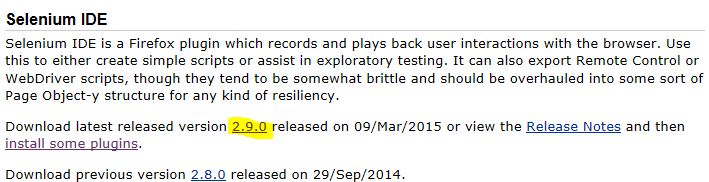
Selenium IDE 2.9.0 Kick Start Installation Guide

It was useless effort all these days to get started with selenium. I did install selenium in past using firefox add-ons and it was really smooth and fast way to do it however somehow this time things were not same as I thought it would be.

Problem:
Coming back to actual problem: Selenium IDE not appearing , then I went to menu, choose customize and then added as toolbar, still no success.

Solution : Brute force method
  • Go to http://docs.seleniumhq.org/download/
  • Search for Selenium IDE. 2.9 , click on firefox 2.9 and save it in desktop or file system.
  • Install .xp file from Add ons .See picture.
  • It will give all set of required library to get started. Click Install now. Selenium IDE appears in tool bar to get you started.


Tuesday, May 26, 2015

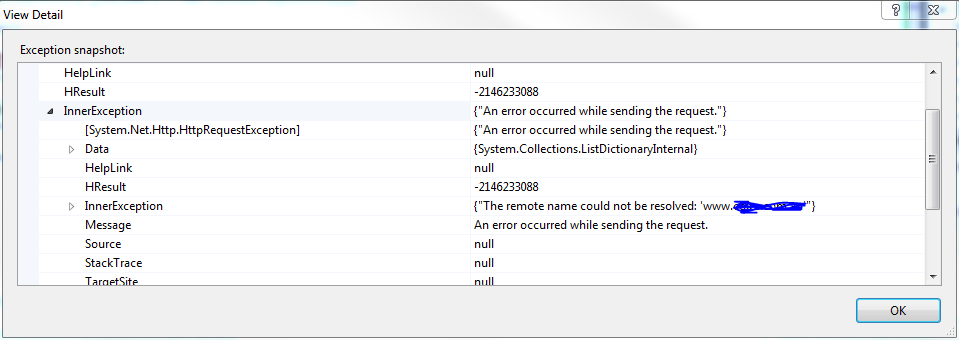
Production Incident 10: Default Proxy Or Proxy Or CORS When Remote Name Cannot be resolved

Issue: Remote Name cannot be resolved.

Scenario: When we call third party or cross domain api within our web api.

Resolution :
  1. Enable CORs at third party api Or
  2. Try to include default proxy
  3. Or specific proxy at your client web APi

<system.net>


  </system.net>
 
Or
<system.net>

http://proxy.XYZ
"usesystemdefault="True" />

</system.net>
 
Or
Enable Cors
 
Error Slab:


Friday, May 1, 2015

Production Support Incident 6: Bad Architecture Design Database server Box having IIS webserver

Architecture Scenario:
A shared database SQL Server physical box or VM contains shared databases which is connected to different web servers hosted with different website. Lets assume within that database box we have IIS configured with WCF hosted service. The initial objective would be the wcf service which is present within database server must be using database table for storing service data. This is bad design.

What is the problem?
Now when we allocate RAM to SQL server box , sql server consumes all the RAM and keep very little RAM for OS activity. Now lets assume we have IIS configured with wcf service with database server and there is very little RAM available for IIS and OS as SQL server consumes most of the RAM memory . In such case there is going to be memory overflow or Network IO wait conditions for website request that are sending requests to this wcf service hosted in IIS that resides within this database server.

Workaround: You have to explicitly allocate RAM for sql server and for IIS to process the requests. The flipside is your sql server may started getting load and RAM consumption may shoot up to peek which may results in Suspended transactions and process requests with latency.

This is design flaw at infrastructure Level hence it is always important to make assessment and revisit architecture.