
Tuesday, March 30, 2021

Thursday, March 25, 2021
Latency vs Bandwidth vs Throughput
We come across these terms Latency, Bandwidth and throughput. Sometimes we might have confused ourselves most of the time. Below images are thousand words.


Sunday, March 21, 2021


Thursday, March 18, 2021
Was SSL now it is TLS

HTTP

HTTPS

SSL

SSL 1.0
SSL 2.0
SSl 3.0
SSL 3.1
Netscape Navigator Browser :SSL 1.0/2.0


History Browser War
{ IE vs Netscape }
In the year 1999 Browser War erupts between Microsoft IE and Netscape Navigator Browser .
Many developers had no choice but to tailor their websites for one browser or the other. Of course, it was ultimately the users that suffered.
With the release of Internet Explorer 3.0, Microsoft dropped the hammer. They included this version, for free, bundled right into the Windows ’95 operating system.
Netscape pricing model fell apart
In November of 1998, Netscape was sold to AOL for $4.2 billion- The end of pioneer.

TLS : Awakening of TLS


Some known facts, 10% of the time ,On prim application downtime is due to expired certificate.

Wednesday, March 3, 2021
Multithreaded operations with the Task Parallel Library
Async Vs Parallel Programming
Asynchronous Programming
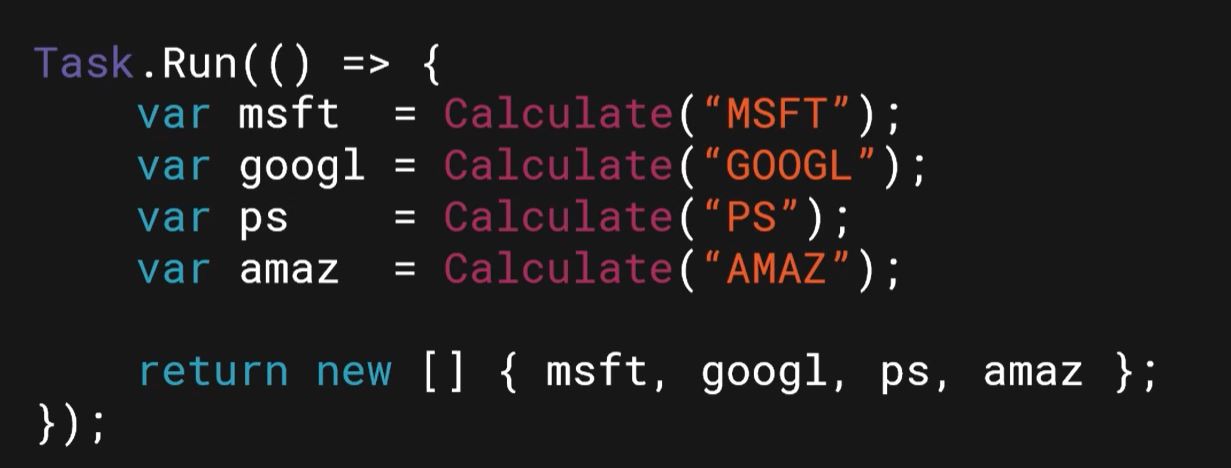
- Task Runs asynchronously however it is dependent on task results and wait for task to get completed. For e.g Operation that calculated Average on large set of data. Now these calculations will happen asynchronously while it wait for complete all its task.
- Async Task run or executes on SINGLE thread
- It is wait dependent


Parallel Task Programming
Threads are the virtual components or codes, which divides the physical core of a CPU into virtual multiple cores. A single CPU core can have up-to 2 threads per core.
CPU is dual core (i.e., 2 cores) it will have 4 threads. And if a CPU is Octal core (i.e., 8 core) it will have 16 threads and vice-versa.
CPU----1 Core--------2 Threads
The thread is created by a process. Every time you open an application, it itself creates a thread which will handle all the tasks of that specific application. Like-wise the more application you open more threads will be created.
For eg. Two thread you can listen to music at the same time you can update a powerpoint presentation.


Wednesday, February 10, 2021
Get Started with Blazor.net web flow project solution
Blazor.net web flow and project details are given below. Before you start Blazor.Net it is important to understand the basic file system and flow of execution.

Monday, February 8, 2021
.Net 5.0 Project Dependencies are now simplified
If you come from a background of .Net framework , you must see hugh improvement and shifts in how we managed project depencies. Let us have a close look.
It is now neatly categorised
- PROJECTS folder dependencies within solution
- Nuget package is bundled under PACKAGES
- Framework reference such as .net core or .net 5 is bundled in FRAMEWORKS folder.
Next time you open Visual studio 2019 solution with Blazor , Xamarin or MVC project you should have figure out this feature.

Monday, February 1, 2021


Tuesday, December 8, 2020
Code Quality Build tools
1. SonarQube -
static analysis that finds all kinds of problems in your code
2. Software Composition Analysis Tools:
- WhiteSource Bolt
- Black Duck (and)
- Snyk
3. Zed Attack Proxy -
a dynamic analysis tool which executes lightweight security penetration tests against your deployed code
Check Azure release pipeline scanning OWASP top 10 issues in your website
https://marketplace.visualstudio.com/items?itemName=CSE-DevOps.zap-scanner
Tuesday, August 18, 2020
VS 2019 and Sitecore TDS 6.0.05 upgrade from Sitecore TDS 5.0
When you first install Sitecore TDS 6.0.05 try to locate tds 6.0 nuget package in your local. This nuget require you to update your reference nuget from 5.0 to 6.0. All you need to do is add new local path of nuget reference in Nuget manager and install this new nuget package.
After you have installed the updated nuget for each of your existing TDS project you might come across this error.
Verify the version of the MSBuild TDS Service DLL

Connection Test Finish: 2020-08-19 10:33:49
Connection Test Start: 2020-08-19 10:35:44
Connection Test Pass: Content downloaded from http://abc-local.com//sitecore
Connection Test Pass: Sitecore TDS connection test successful
Connection Test Failure: Sitecore TDS Service DLL does not exist at \HedgehogDevelopment\SitecoreProject\v9.0\bin\HedgehogDevelopment.SitecoreProject.Service.dll.
Connection Test Finish: 2020-08-19 10:35:44
Connection Test Start: 2020-08-19 11:09:03
All you need to do is unload the .csproj and edit the tds .csproj section where it imports the package service.dll into sitecore solution
Thursday, August 13, 2020
Azure App Configuration Feature toggling using Feature Manager
You can store all feature flags in Azure App Configuration and administer them from a single place. App Configuration has a portal UI named Feature Manager that's designed specifically for feature flags. App Configuration also natively supports the .NET Core feature-flag data schema.
In this tutorial, you learn how to:

- Define and manage feature flags in App Configuration.
- Access feature flags from your application.
Reference:Sample Feature toggling
Subscribe to:
Posts
(
Atom
)