Thursday, September 1, 2022

Kubernetes 101 Know how

Clusters| Nodes| Pods| Helm

Node := Master Node + No. of Worker Nodes

Analogy: Cluster is like a train and Nodes are just like a compartment 


Kubernetes clusters are comprised of one master node and a number of worker nodes. These nodes can either be physical computers or virtual machines, depending on the cluster. The master node controls the state of the cluster; for example, which applications are running and their corresponding container images. 


25 supports clusters with up to 5000 nodes. More specifically, Kubernetes is designed to accommodate configurations that meet all of the following criteria: No more than 110 pods per node. No more than 5000 nodes

What are pods and clusters in Kubernetes?
A Kubernetes cluster consists of a set of worker machines, called nodes, that run containerized applications. Every cluster has at least one worker node. The worker node(s) host the Pods that are the components of the application workload. The control plane manages the worker nodes and the Pods in the cluster.

Helm is a Kubernetes deployment tool for automating creation, packaging, configuration, and deployment of applications and services to Kubernetes clusters. Kubernetes is a powerful container-orchestration system for application deployment

Tuesday, August 23, 2022

Content Security Policy CSP In or Out

Content Security Policy Script-src is something that tech lead or developer might have come across . This is one of the most common low security vulnerability defect raised by external penetration tester. They might suggest to whitelist Js library or third party libraries to safe guard against XSS attack. 

CSP protect from XSS


Well if you are working on .Net the only option you have is to add custom response header in Web.config file and list all JS. But here is the catch if you working with third party analytics this become tricky. There is a constraint and challenge to do so. Per say, these analytics injects lot of js libraries at runtime. It can be facebook , google tag manager, live person, social media plugins or advert. This is where one needs to draw line and give business technical reason why this cannot be achieved. Next stuff is browser compatibility. Under the hood testing will become exhaustive and chances are these are prones to more defects that leads to unknowns while move to production. Next time you come across CSP , think twice do your thorough research before you commit something. 

Sitecore XM Cloud Troubleshooting Part 2 Remote name could not be resolved 'dist.nuget.org'

Remote name could not be resolved 'dist.nuget.org'


Solution

Next, set the Interface Metric to 1 for Wi-Fi

Set-NetIPInterface -InterfaceAlias 'Wi-Fi' -InterfaceMetric 1


https://sitecore.stackexchange.com/questions/26095/remote-name-could-not-be-resolved-dist-nuget-org


Monday, August 22, 2022

Sitecore XM Cloud Deep Dive Troubleshooting Part 1

 I started with Github repo and followed the step. I got error while running the step given below

Bring up all the application elememnts for Local Mode

Next, use the up.ps1 script to bring up all of the containers required for Local Mode.

.\up.ps1
ERROR
a Windows version 10.0.20348-based image is incompatible with a 10.0.19042 host
I refer version of docker 
https://hub.docker.com/_/microsoft-dotnet-sdk
Go to .env file and change this configuration 
FROM
NETCORE_BUILD_IMAGE=mcr.microsoft.com/dotnet/sdk:6.0-nanoserver-ltsc2022
NETCORE_RELEASE_IMAGE= mcr.microsoft.com/dotnet/aspnet:6.0-nanoserver-ltsc2022
TO
NETCORE_BUILD_IMAGE=mcr.microsoft.com/dotnet/sdk:6.0.400-nanoserver-1809
NETCORE_RELEASE_IMAGE= mcr.microsoft.com/dotnet/aspnet:6.0.400-nanoserver-1809

Wednesday, July 20, 2022

C# Expression bodied Method reduce lines of code

C#: String.IsNullOrEmpty vs String.IsNullOrWhiteSpace

C#: String.IsNullOrEmpty vs String.IsNullOrWhiteSpace

Wednesday, August 18, 2021

Best Practice Csharp Use NameOf for Constant

Productivity Tool MSBUILDLog and Project

Download https://msbuildlog.com/


Visual Studio Build Log Extension

https://marketplace.visualstudio.com/items?itemName=VisualStudioProductTeam.ProjectSystemTools

Monday, August 16, 2021

Hello world Csharp

Next time you write Hello World! Do this,

using static System.Console;
public class Program {
static void main() => WriteLine("Hello World");
}


Csharp Interface with same method implementation

Saturday, June 5, 2021

Clean Code Exception Filters in c#


Clean code always looks like it was written by someone who cares.”
― Robert C. Martin, Uncle Bob

C# Exception filters has been around since advent of C# 6.0 , I'm sure we rarely use it because we are so used to old way of using conditional exception handling.

Cut to the chase........!

Run dotnet in browser
https://try.dot.net/
No alt text provided for this image

Happy Coding!


Saturday, May 29, 2021

Azure Managed Identities- System Identity vs User Assigned Identity


Managed Identities

Managed Identities are in essence 100% identical in functionality and use case than Service Principals. In fact, they are actually Service Principals.

What makes them different though, is: – They are always linked to an Azure Resource, not to an application or 3rd party connector – They are automatically created for you, including the credentials; big benefit here is that no one knows the credentials

Managed Identities exist in 2 formats: – System assigned; in this scenario, the identity is linked to a single Azure Resource, eg a Virtual Machine, a Logic App, a Storage Account, Web App, Function,… so almost anything. Next, they also “live” with the Azure Resource, which means they get deleted when the Azure Resource gets deleted. – User Assigned Managed Identity, which means that you first have to create it as a stand-alone Azure resource by itself, after which it can be linked to multiple Azure Resources. An example here could be out of an integration with Key Vault, where different Workload services belonging to the same application stack, need to read out information from Key Vault. In this case, one could create a “read KV” Managed Identity, and link it to the web app, storage account, function, logic app,… all belonging to the same application architecture.

Let’s walk through a quick demo scenario for both, using a Virtual Machine as Azure Resource:

  • From the Azure Portal, select the Virtual Machine; under settings, find Identity
  • Set Status as On, and save the changes
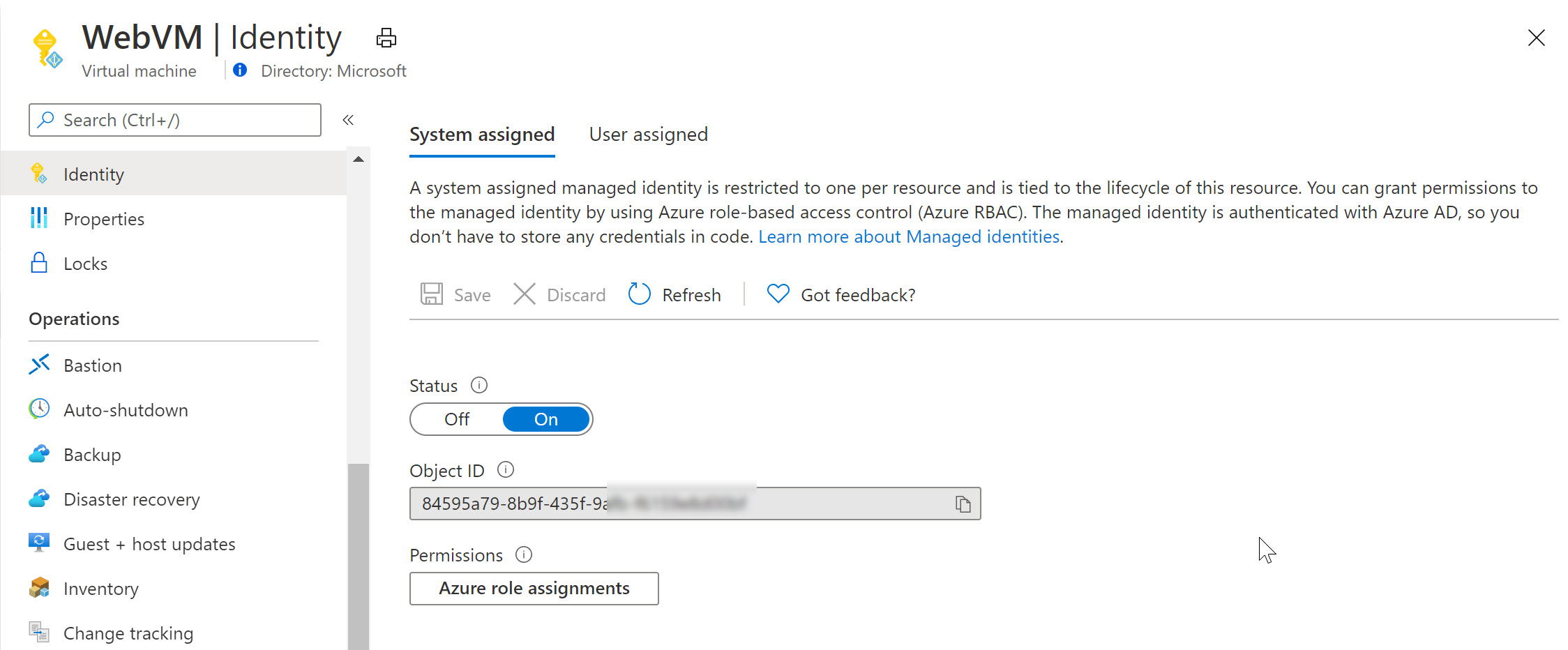
System Assigned

Switching to Azure Key Vault / Access Policies, we can now define this System Assigned Managed Identity having get and list permissions (or any other) for keys, secrets or certificates. For example reading out an Azure Storage Account Access key or similar.

Notice how Azure Key Vault is expecting a Service Principal object here (where in reality we are using a Managed Identity).
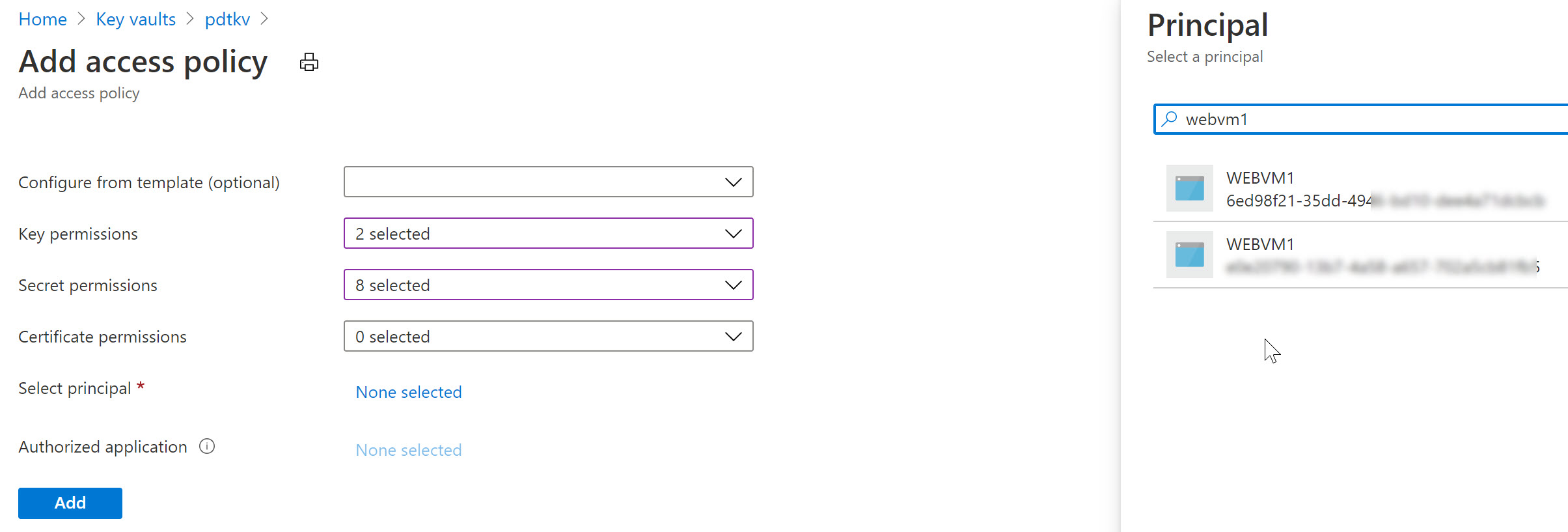
Access Policy

Similarly, let’s remove the System Assigned MI of the VM and use a User Assigned one in the next example (an Azure Resource can only be linked to one or the other, not both…):

  • From the Azure Virtual Machine blade, navigate to Identity and switch the “Status” toggle button to Off.
  • This will prompt for your confirmation when saving the settings
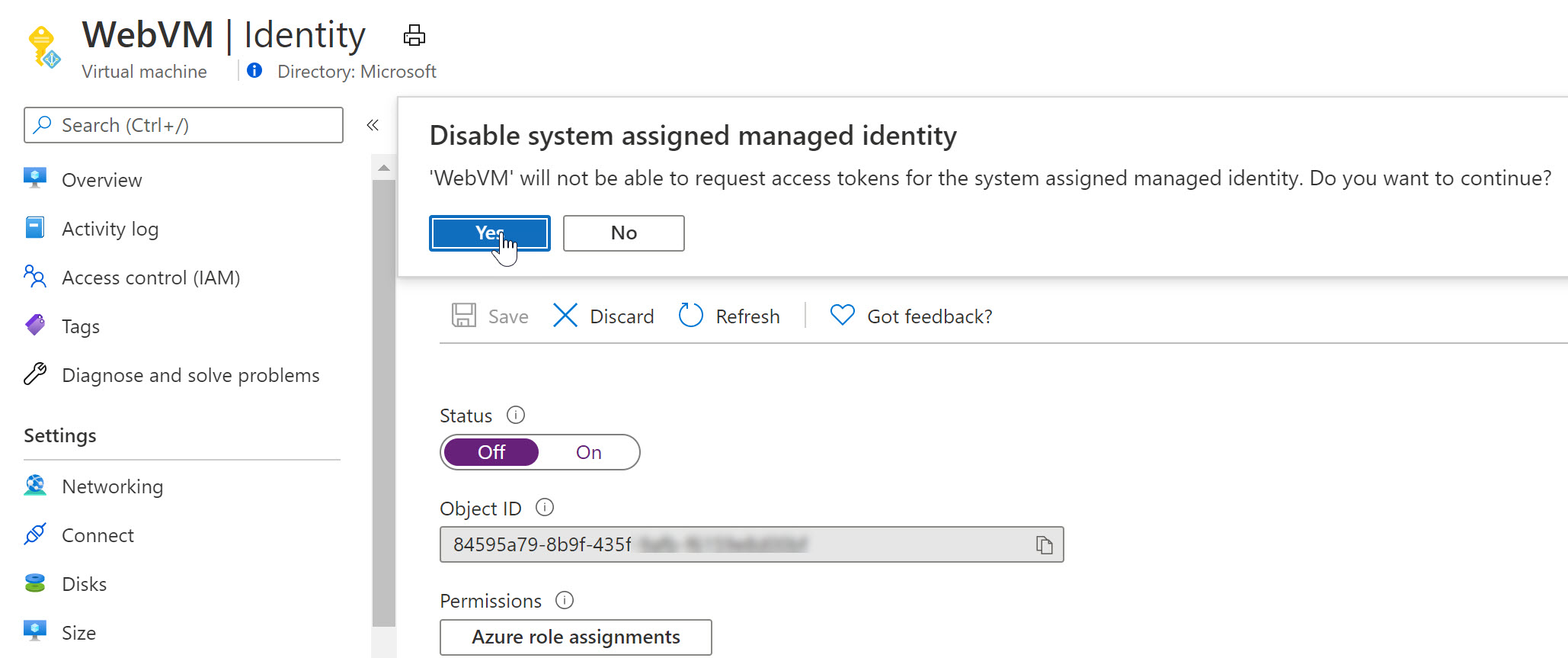
Confirmation

As you notice, the Managed Identity object gets immediately removed from Azure AD. Yes, security is key here…

  • Wait for the deregistration of the object.

Remember that a User Assigned Managed Identity is a stand-alone Azure Resource, which needs to be created first, after which you can assign it to another Azure Resource (our VM in this scenario).

  • From the Azure Portal, Create new Resource, and search for “User Assigned Managed Identity”
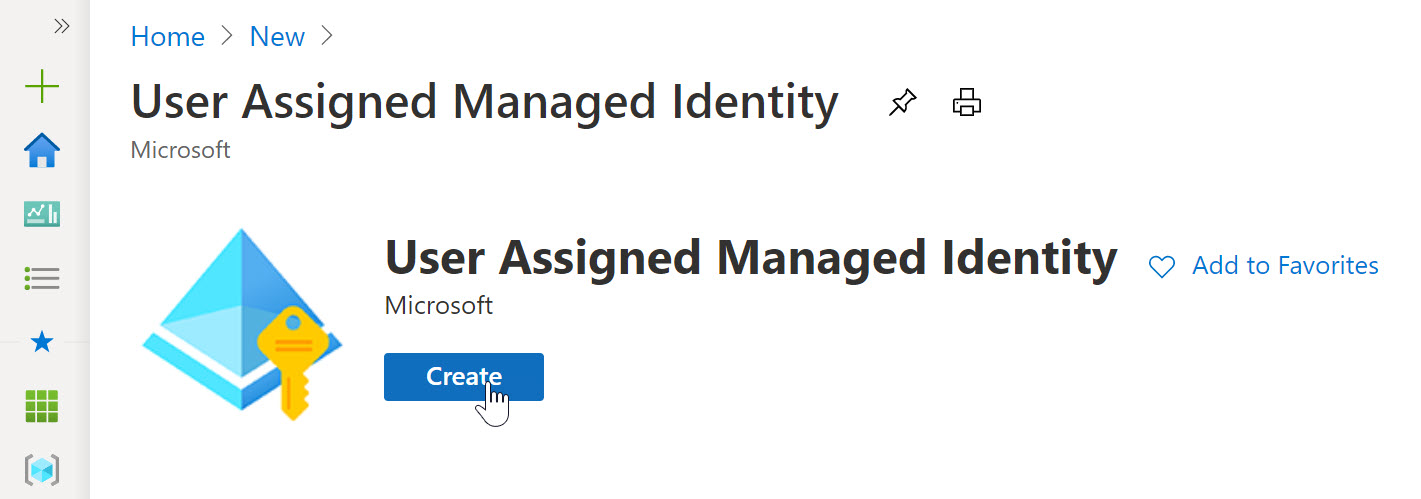
User Assigned

  • click Create.
  • Specify the Resource Group, Azure Region and Name for this resource.
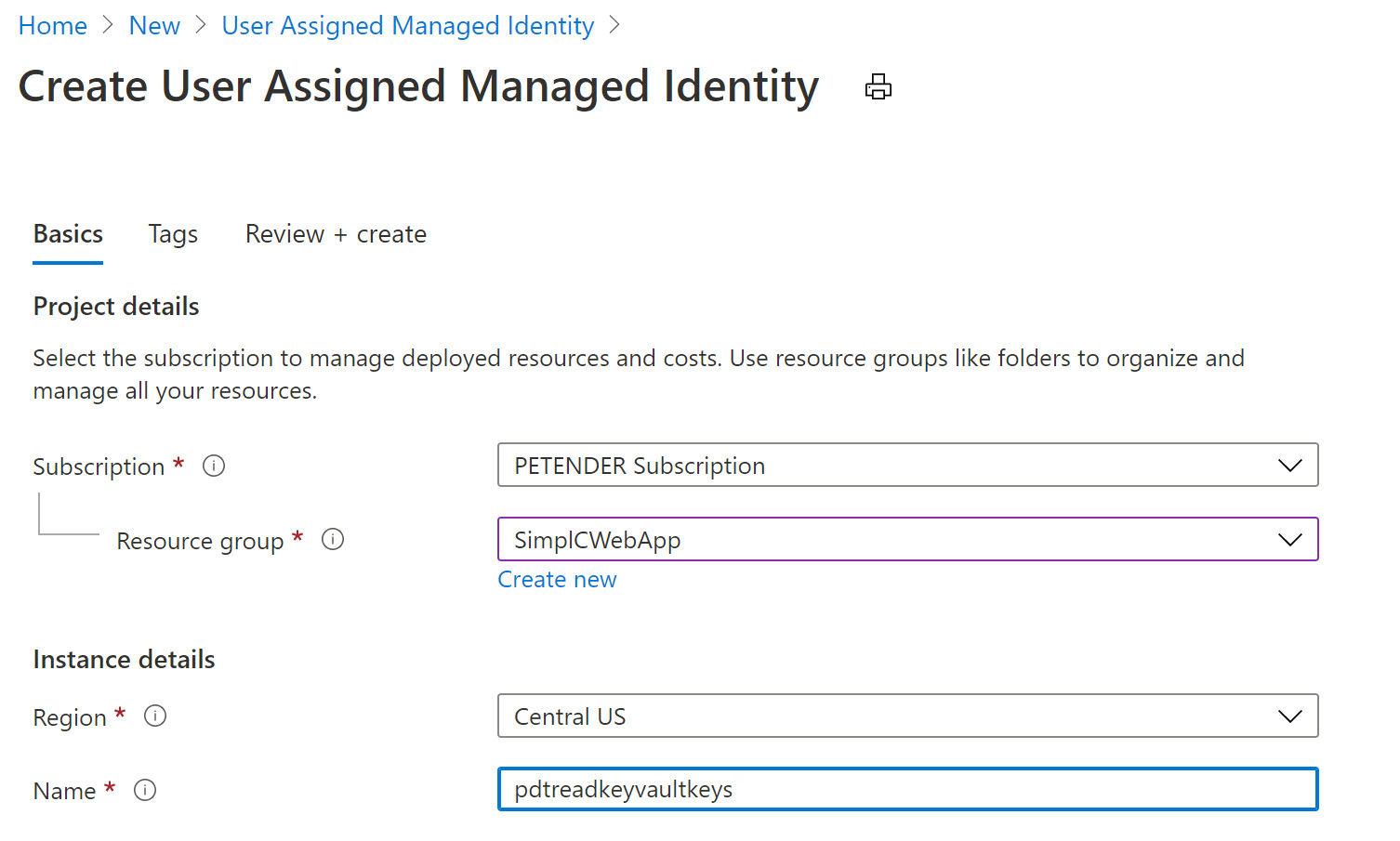
User Assigned

  • Confirm by clicking create and Wait for the resource creation to complete successfully.
  • Once created, switch back to the Azure Virtual Machine, select Identity and select User Assigned
  • Notice the Managed Identity you just created.
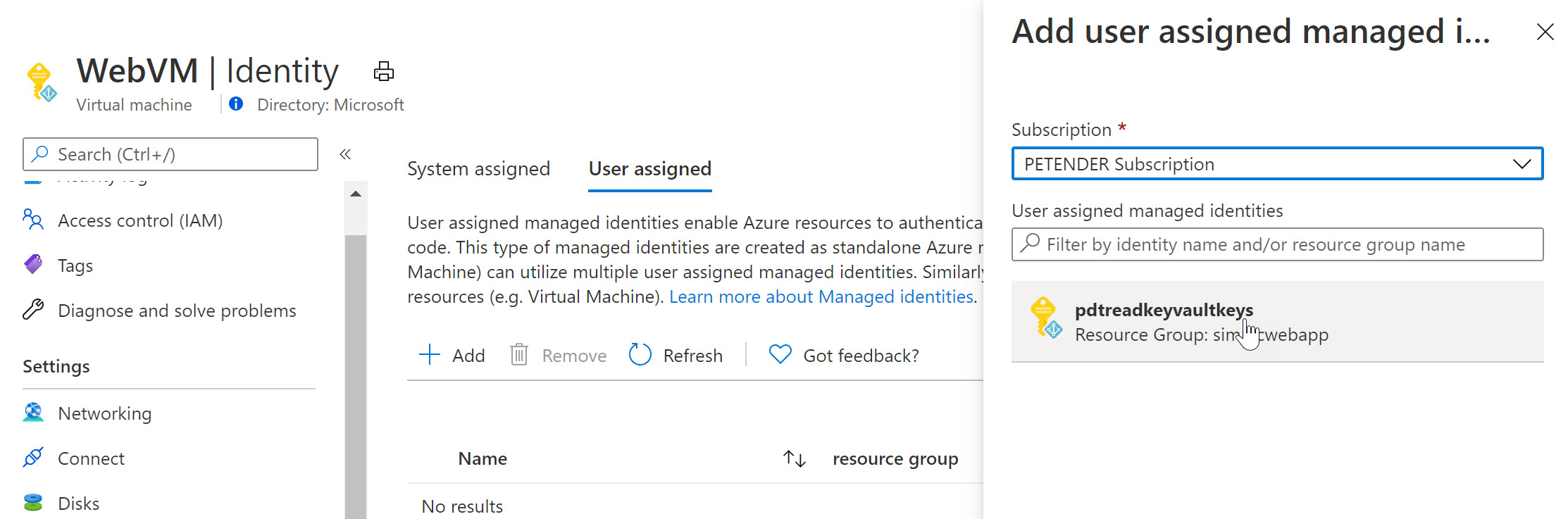
User Assigned

  • Select it and add it as a Virtual Machine User Assigned object.

  • Select another Azure Resource in your subscription, for example an Azure Web App, Logic App,… and once more select Identity from the settings. Below screenshot shows what it looks like for an Azure Web App Resource:
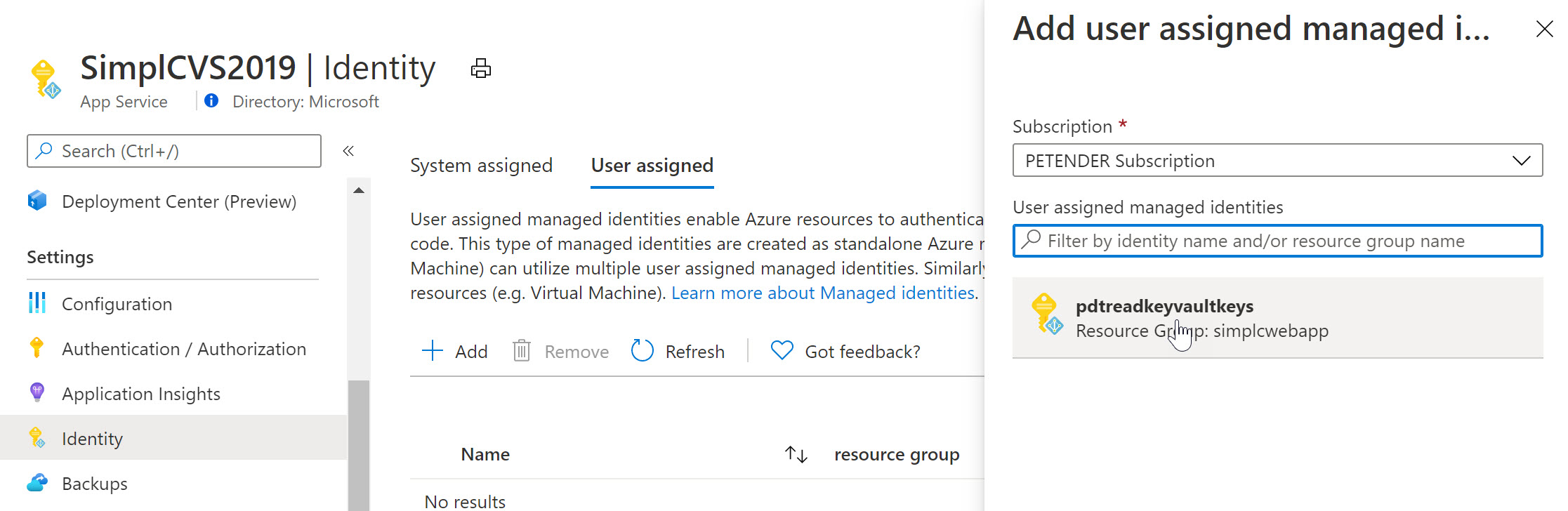
User Assigned

To complete the sample scenario, let’s go back to Azure Key Vault, and specify another Access Policy for this User Assigned Managed Identity:

  • Select your Azure Key Vault resource, followed by selecting Access Policy from the settings.
  • Specify the Key and/or Secret Permissions (for example get, list)
  • Click “Select Principal” and search for the User Assigned Managed Identity you created earlier
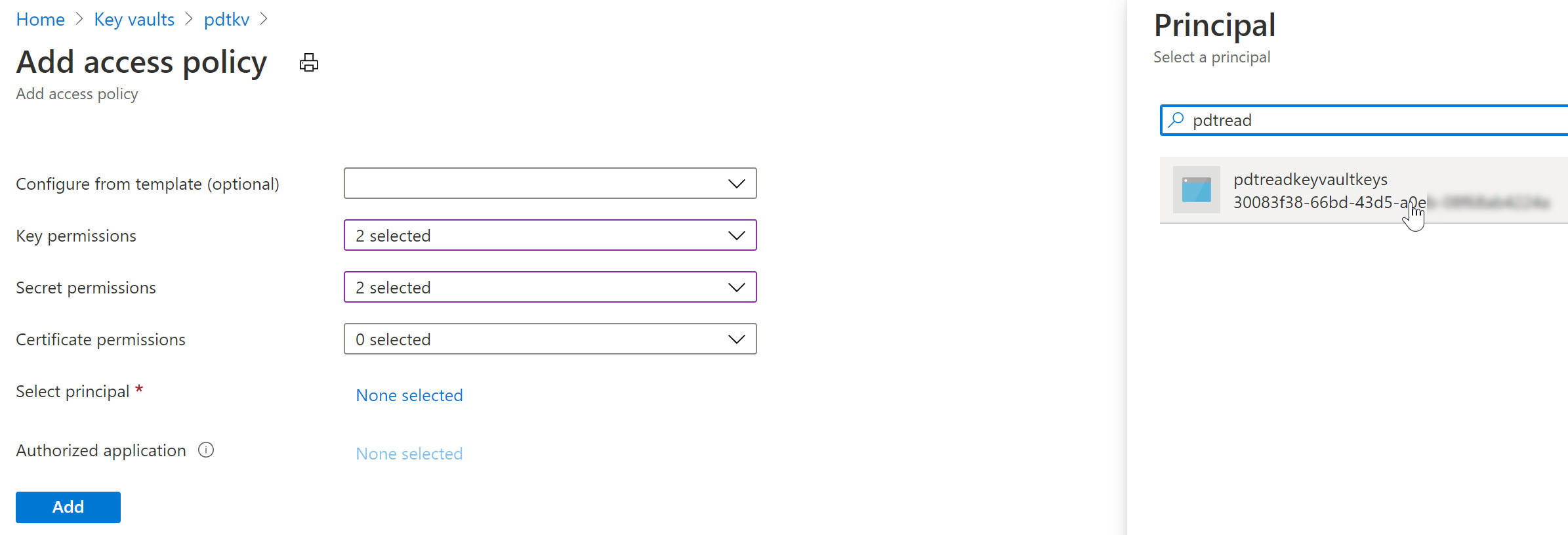
User Assigned

After saving the changes, the result is that now both the Azure Virtual Machine as well as the Web App – having the User Assigned Managed Identity assigned to them – can read our keys and secrets from Azure Key Vault.

Summary

In this post, I wanted to clarify the use case, difference and similarities between Service Principals and Managed Identities. A Service Principal could be looked at as similar to a service account-alike in a more traditional on-premises application or service scenario. Managed Identities are used for “linking” a Service Principal security object to an Azure Resource like a Virtual Machine, Web App, Logic App or similar. For a 1:1 relation between both, you would use a System Assigned, where for a 1:multi relation, you would use a User Assigned Managed Identity.

Technical Architect B2B and B2C Authentication , Authorization and Access Policy


Azure messaging services - Event Grid, Event Hubs, and Service Bus


Comparison of services


COMPARISON OF SERVICES
ServicePurposeTypeWhen to use
Event GridReactive programmingEvent distribution (discrete)React to status changes
Event HubsBig data pipelineEvent streaming (series)Telemetry and distributed data streaming
Service BusHigh-value enterprise messagingMessageOrder processing and financial transactions

Wednesday, May 26, 2021

Azure Traffic Manager , WAF CDN , DNS -Load Balancer

 Client Browser--> DNS Lookup---> WAF/CDN---> Azure Traffic manager--> Main Site URL and DR (Disaster Recovery URL)


Tuesday, April 27, 2021

Cool Stuff Microsoft Math Solver in Microsoft EDGE browse

 Go to the three dotted , click on it then select Apps-> Manage App

On the Edge Search Bar ,S type in Flags , see the screenshot for more details.


It is experiments package, so Click on ENABLED and then on Restart button to initiate and installation of this app.


Load some Algebraic Equation to test this app.


Voila!
You can also check out PhotoMath App for Android and IOS. 
Technology is evolving fast. Get a taste of it.

Saturday, April 24, 2021

Web Developer must know -File Sharing Protocol Filesystem- NFS, SMB, AFP and FTP


File sharing protocols: Application Layer 

Protocol

Description

SMB (Server Message Block)

Supported by Microsoft Windows computers and sometimes by Mac OS X protocol is enabled by default. It is sometimes referred to as the CIFS (Common Internet File Service) file-sharing protocol.


SMB uses TCP/IP.

NFS (Network File Service)

Linux and Unix computers use NFS. Mac OS X users can access NFS shared folders through console shell access.

UDP and TCP and NFS v4 over TCP.

AFP (Apple File Protocol)

Mac OS X computers use AFP.

FTP (File Transfer Protocol) and FTPS (FTP with SSL encryption)

Many public file upload and download sites use FTP.

Rsync

Fast file-transfer protocol that uses a delta-transfer algorithm that sends only the differences between the source file and the existing file.

HTTP (Hypertext Transfer Protocol and HTTPS (HTTP with SSL encryption)

Used on the World Wide Web.

SSH( Secure Socket Shell

Remote access to machine vis SSH connection.