Tuesday, August 6, 2019

C# Null Object Design pattern

public Customer GetByPhoneNumber(string phoneNumber)
{
  return _customerRepository
         .List(c => c.PhoneNumber == phoneNumber)
         .FirstOrDefault();
}

Problem with null


var customer = GetByPhoneNumber(phone);
 //Why null check this break design principle 
int orderCount = customer != null ? customer.OrderCount : 0;
decimal totalPurchase = customer != null ? customer.TotalPurchase : 0m;

Create NotFound Object Property


public class Customer
{
  public static Customer NotFound = 
     new Customer() { OrderCount=0, TotalSales=0m };
 
  // other properties and behavior
}

Final outcome No Null checks required


var customer = GetByPhoneNumber(phone);
int orderCount =  customer.OrderCount ;
decimal totalPurchase =customer.TotalPurchase;

Azure Devops Remote debugging Nuget package with Symbols in pipeline

Enable Remote Debugging in Azure Devops Pipeline

Enable remote debugging options in solution Visual studio options

Add task in nuget package build pipeline


Sunday, August 4, 2019

Azure Devops Engineering Code quality

High Level View

  • Code Analysis- Static vs Dynamic code analysis
  • Unit Testing / Code Coverage
  • Security :OWASP Top 10
  • Performance: Load Testing

Code Analysis

Static Code Analysis

LOC- Lind of code = Cyclomatic Complexity of code base(Visual Studio Code Metrics)


Monday, July 29, 2019

A Day in the life of sitecore developer

Just to be specific sitecore developer working on .Net cms part of it. Sitecore is vast.

Junior Sitecore Developer


Able to Implement/develop/code with .net and sitecore item

Sitecore Developer


Able to Implement/develop/code with .net and sitecore item
Tools :

  1. Sitecore Rocks
  2. SIM
  3. TDS
  4. Sitecore Powershell extension
  5. Sitecore Log Analyzer

Senior Sitecore Devs


Able to Implement/develop/code with .net and sitecore item
Tools :

  1. Sitecore Rocks
  2. SIM
  3. TDS
  4. Sitecore Powershell extension
  5. Sitecore Log Analyzer
  6. Azure Devops
  7. Raise Sitecore Ticket , know how proc dump, sitecore support request handling
  8. Performance debugging and troubleshooting. Working with perf team on load testing and so on


Best example or easy use case to understand Azure Logic Apps

Simple way to understand Azure Logic Apps

Here’s an example:

A logic app gets triggered by a new blob that is written in Azure Blob storage. It takes the Blob input, which is an image file, and resizes the image by calling an Azure function that does just that. Next, it takes the resized image and writes it to another storage account. And finally, it calls the Office 365 API to send an email to the administrator that there is a new, resized image available.

Just like Azure functions, logic apps scale automatically, you just create the process. It will trigger as many times as it is needed and always executes the complete process and has reliability features, like retry policies, built in. And because it only runs when it is triggered, you only pay for when it runs—you don’t pay for owning it. 

https://dotnet.microsoft.com/download/thank-you/azure-quick-start-ebook 

Visual Studio 2019 Live Share

Why we need Cisco web share ? We have Visual Studio 2019 live share that makes collaboration within team or remote team very easy. You have team sitting remotely and you want to share your visual studio solution, it is made easy.

You can do live sharing of IDE , you can see live debugging and browsing or running of application from developers local machine.


Saturday, July 27, 2019

VS 2019 Debugging made easy

VS 2019 Debugging made easy

1. Run to click, I called it as Temporary breakpoint.
2. Stick around or Pin data result
2. Local
3. Debugger Display
4. Move around display and anchor it for future reference


Reference:

Blog
Leslie Richardson
https://devblogs.microsoft.com/visualstudio/customize-object-displays-in-the-visual-studio-debugger-your-way/?WT.mc_id=vstoolbox-c9-niner

https://channel9.msdn.com/Shows/Visual-Studio-Toolbox/Debugging-Tips-and-Tricks-Part-1


Sunday, May 12, 2019

Sitecore Smart Strategic Move BUT it is long way to

Acquired Hedgehog!

Sitecore Announces Intention to Acquire Hedgehog, Plans Expanded Support for Partner Ecosystem to Help Accelerate Digital Transformation Initiatives for Customers


At the moment, I still feel, the heart of sitecore and main driver for them is Sitecore CMS engine which is what the main area of progress. Right now Sitecore is trying to jump into so many things that is very hard to create a good marketplace unless its so called chosen MVPs drive it to its great potential. That I think is next to impossible. 

There are lot of loop holes and gaps how Sitecore select its MVPs. If you look at how Microsoft select and get its MVPs is based on lot of criteria. Not to go too much into this right now. 
What my intent is what Sitecore should now? Why sitecore investment in cortex, ecommerce and other digital stuff needs thorough lookout.

Small things can do wonders for Sitecore:-


1. Sitecore may include glass mapper to it
2. Sitecore should focus on SXA . I think it is got potentials
3. Sitecore should revamp cms UI and make it more fluid. Content Author not liking the old use interface, usabiility and other stuff.


Big Bang ! Dot Net Core

Sitecore should move to .net core as soon as possible, Lot of things to get going. It has huge savings in terms of infrastructure, performance, availability and scalable.


Monday, May 6, 2019

Project dependencies hell! Metafile build errors

Solution User Options (.Suo) File


The solution user options (.suo) file contains per-user solution options. This file should not be checked in to source code control.
The solution user options (.suo) file is a structured storage, or compound, file stored in a binary format. You save user information into streams with the name of the stream being the key that will be used to identify the information in the .suo file. The solution user options file is used to store user preference settings, and is created automatically when Visual Studio saves a solution.

Troubleshooting & fix!
Sometimes it might happen your built might results in errors across projects within a given solution. You lost all project dependencies defination in Solution Property. 

Workaround!
Delete .SUO file and restart the visual studio with solution open. Dependencies will restore and build pass successfully.

Tuesday, March 5, 2019

Integrate Google Oauth 2.O OpenId without Owin in sitecore asp.net mvc

Introduction:

I've sitecore 8.2.1 and content delivery web app is integrated with form based authentication. I enabled third party google login using OAuth2.0 open id without using .net OWIN or Sitecore OWIN setup. 
I just keep the whole flow simple with very minimal impact to the overall architecture. Made solution easy to decouple in future or reuse it across the different project.

The below problem statement is addressed while implementing this solution
  • Handle Session timeout for form based users and google logged in users differently
  • Handle log-off so that user is redirected to specific login page.
  • Handle CSRF Cross side anitorgery token using State property of api call.

Let's get started

I assume one understand to enable google oauth using developer console and well verse with the whole steps of how google oauth and api is enabled for us to proceed. If not I recommend to go through this using below links

It is two step implementation

  1. Create a separate login screen or existing screen for that matter. Assume there is a button say google login in it. On click of it , it will initiate google login screen and consent form etc.Google returns Authorization code.
  2. When user select his/her google account and give consent user is redirected to respective home or landing page. In this part access token is received based on Authorization code. Custom authorization can be checked against custom application database and accordingly user will be redirect to landing page. Mind it. The first redirection url is registered with google that is where we will write our login in controller action. 

Initiate Google Login process


Key take away

In order to work through different login mechanism the only way to handle session and log-off is to set a application level state flag.
Set something at very beginning of login initialization

HttpContext.Application.Add("google_logged_in_users"true);


Also very important once we get google access token and we verify google users to have access to our system. It is important to check @if (User.Identity.IsAuthenticated)


please note above code is just for reference and it is draft version. You can refine and refactor as per your needs.

Reference:


Wednesday, November 28, 2018

Collection constructor with collection initialzer

You can pass anything that is a valid constructor parameter. For example, List permits construction from any enumerable, so you can do this:

this combination notation is useful if you want to clone an existing collection and then make some tweaks to it.

Wednesday, November 14, 2018

Real world Use Case Linq Aggregation

Problem statement

We want to process numbers and categorized them into categories. This could be any data and we want to classify them based on requirement. Just to create small proof of concepts here is the sequence of numbers and idea is to classify them into even, odds and so on.

Solution Statement

Linq Aggregate with Union to show them all.

Class Diagram


Implementation Details

Number Class


Enum NumberType 

NumberGroup Classes


INumberGroup


NumberFilter Class


Main Calling Function
This is it!


Wednesday, September 19, 2018

OneNote Immersive reader Microsoft learning tool

It is one of the amazing tool or add ins for OneNote users. This is very helpful for students and content author to proof reads or improve their language skills.

Long Story short.

Install this plug-ins free of charge if you are OneNote user.

https://www.onenote.com/learningtools


Thursday, May 17, 2018

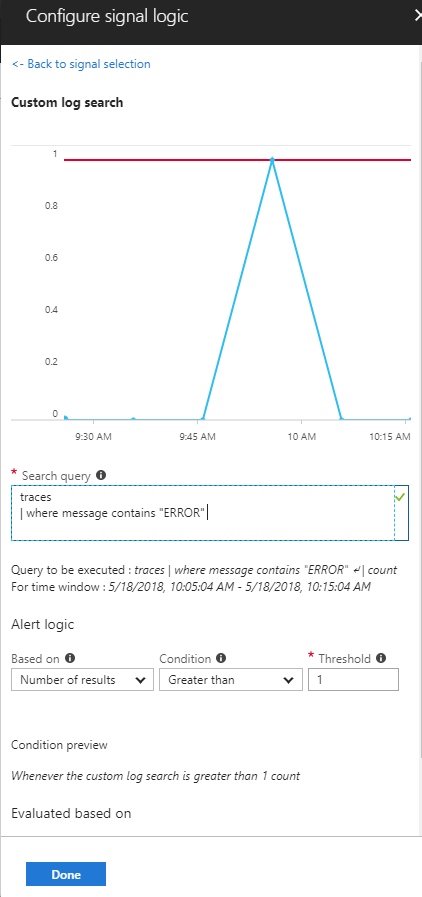
Azure AppInsight Custom Logs Alerts at very granular level with queries

Introduction

An alert service has become more powerful day by day due to advent of Azure AppInsight. Microsoft is actually listening to developer and support/operation  aka (devops) team very closely. Now we can get alert at very granular level. Whenever you performance test or UAT testing it is good to enable sitecore logs trigger straight into your mail box or into slack or any web hooks. It is easy done. I keep this demonstration simple . I injected simple trace sitecore logs query which will be triggered every 10 mins if error count greater than 1.

Open your Applnsight blade, look for Alert and add new alert . Below screenshot is self explanatory.

Cool part about it you can add any level of AppInsight Analytics query in it. It is very flexible.

E.g
traces
| where message contains "ERROR"


Monday, April 9, 2018

Custom Attribute ValidateApplicationPermission 403 Access Denied Leak and MVC filters

This is always the case when we write some custom filter without being understanding the sequence which we should be using.

One classic example is to handle custom Unauthorized Access for application permissions at Controller Action level. Say if it user has authorization of application but some of the permission is not allowed and still it executes controller-action then it is a serious issue.

[Authorize]
SomeController
{
      [ValidateApplicationPermission]
      SomeAction
    {

    }
}

Problem Definition: 

ValidateApplicationPermission results into 403 access denied leak. It captures access denied and tries to redirect however it is redirecting with executing existing action filter which it should not suppose to be.

For. Eg
Using something like this, here we are trying to use filterContext with HttpContext
filterContext.HttpContext.Server.TransferRequest(Entities.Constants.Entities.Content.Something.Home._403.Path
                            .GetSitecoreItemUrlPath());  

Solution

Use filterContext with its Result, obey filters and its context.
filterContext.Result = new RedirectResult(Entities.Constants.Entities.Content.Something.Home._403.Path.GetSitecoreItemUrlPath());


Implementation Code Base

Wednesday, April 4, 2018

Awesome-ness of AppInsight Analytics and Failure Preview

The Microsoft Azure AppInsight has made so much easy for us to trace the request execution sequence for any exception traces. You can actually see how the request has been executed for given exception. This way it is very easy to troubleshoot and fine actual root cause of the problem.

Check out for following stuff in Azure AppInsight

  • Failure (Preview)- New feature within AppInsight
  • Operation Id- Locate operation id for any specific exception
  • Open up AppInsight Anaytics query analyzer to view the sequence trace leading to an exception.

 Failure (Preview) Blade

  • Lookup for Count(Failed) vs total request
  • Top 3 Response Codes
  • Top 3 Exception Types
  • Last 24 hours or custom date filter. Slide through graph date statistics. Awesome-ness
  • Operations vs Dependencies vs Exceptions tabs
  • Nevertheless View in Analytics 

Suggested- Click on one of the exception to view Operation ID and from this operation id you get all trails and missing piece of an issue.


End to End transactions


Tuesday, March 6, 2018

Sitecore MVC Routing using sitecore pipelines approach

Case Study:

It is very important to separate CMS and CD level MVC routing . When we deploy CD content delivery for any web then it should have very specific routing for the web and most of the cms specific routing should be entrusted to cms solution. It is simple you move all the cms level custom route to custom library and later reference and allow to run at runtime using config patch specific to environment. Like SiteSetting.CMS.Config vs SiteSetting.CD.Config this is will part of continous deployment where it will be picked up during depployment to specific cms and CD environment. By doing this we are separating the responsibility and it help maitain consistent approach specific to cms and cd. This also good for performance of application and it will not conlict with web solution specific to its functionality.

CD with specific to web page
Say http://abc.com/homepage which internally call api via ajax -xhr request say http://abc.com/abc/api/home/Get

CMS with specific to admin or shell page
http://abc.cms/sitecore/admin/api/user this is very specific to cms

Now when you are employing this solution in MVC ensure it is separated for each of this environment. The cms web server will have routing logic loaded at runtime specific to its env without adding extra overload to web CD environment.
Ref:

Implementation Logic

Monday, March 5, 2018

Keyvault access :Certificate give permission to Protected item

Introduction

If you are working with keyvault, ensure you import client certificate with proper permission for it to work properly in your development or local machine. This is most common error and you won't be able to figure out the issues unless you create standalone console app to troubleshoot. The keyvault will always fail at this method and it goes in infinite loop.
public async Task<string> GetAccessToken(string authority, string resource, string scope)
       {
           var context = new AuthenticationContext(authority, TokenCache.DefaultShared);
           var result = await context.AcquireTokenAsync(resource, _clientAssertionCert);
           return result.AccessToken;
       }

Stackoverflow

https://stackoverflow.com/questions/34812897/how-to-suppress-an-application-is-requesting-access-to-a-protected-item-popup

Important Note:

Web application may not prompt you with above security pop-up unlike console application.

Fix/Workaround

Run ->type  MMC
Go to your user personal certificate and delete existing certificate that is application specific and import again with below checkbox status in place.


Thursday, March 1, 2018

Calculate distance between two Geo location using Google Map API

Introduction

In order to run this proof of concept , we need google api  key,API_Key This can be obtain as per your personal google account credential. create project in developer console in google and generate api_key for you to create proof of concept to consume google api.

Try Out Proof of concepts: Hosted in JSFiddler

Google Developer Console Login


Create Project in Google API Console

Google Distance Matrix API

Google Autocomplete Location API

Production Implication

Create account for BUPA or contact IS support for the same.
FREE QUOTA

Key Implementation things to note

  • Use new google.maps.DistanceMatrixService(); for recommended route.
  • The below example can be useful to find distance for multiple source and destination location
  • You can limit auto complete or restrict to specific countries.   destinationautocomplete.setComponentRestrictions({
  •     'country': ['aus']
  • Use new google.maps.DirectionsService() to calculate alternative routes with legs and steps directions
  • Property setting optimizeWaypoints: true gives accurate distance remove complexity such as turns and other criteria
  • Property setting provideRouteAlternatives: true, helps you find all route path options
  • It used traveling salesman algorithm for optimal map routing with google maps.->optimizeWaypoints

Code Base Implementation

Tuesday, February 6, 2018

MVC File Upload using Client side and Server Side

Purpose :-

We can achieve file upload either using any of the below options

  • File Upload using html input file field with Jquery Ajax to call server side web api
  • File Upload using MVC Razor Html.BeginForm to call asp.net mvc acction controller or web api
Below code base cover above implementation.


Key technical specifications :-


  1. Enctype =multipart/form-data
  2. List if using out of box asp.net
  3. Request.Form pass through Ajax Jquery or some sort of js library to read file in asp.net
  4. MultiPartFormBoundary 
  5. ContentType MediaTypeHeaderValue("application/octet-stream")

Implementation